If you are designing a curtain wall that has gables in the roof line or steps in the floor line, there may be occasions when you do not want the grid to extend into those areas. To define your curtain wall in this case, you can define a single-cell horizontal grid that excludes those areas, and then use that grid as a starting point for nested grids.
- Click
 .
. 
- Expand Architectural Objects, and expand Curtain Wall Styles.
- Select a curtain wall style.
- Click the Design Rules tab.
- In the left pane, select Divisions under Element Definitions.
- Select a Division definition or create a new one.
- Select Horizontal for Orientation.
- Select Baseline/Base Height for Division Type.
- Select Divide at Baseline or Divide at Base Height.
- Divide at Baseline: Forces a division at the baseline to exclude steps from the grid.
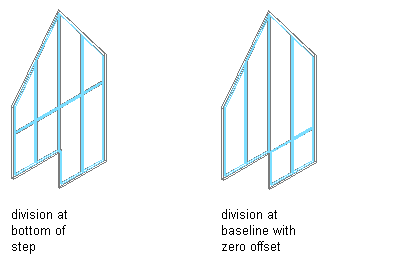
- Divide at Base Height: Forces a division at the base height to exclude gables from the grid.
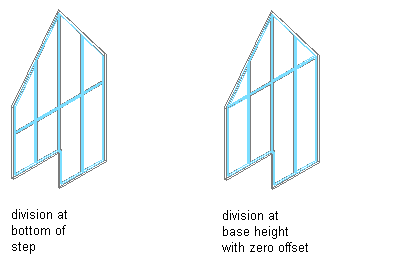
- Divide at Baseline: Forces a division at the baseline to exclude steps from the grid.
- To offset the division from the baseline, enter a positive number for Baseline Offset.
- To offset the division from the base height, enter a positive number for Base Height Offset.
- Click OK.
The resulting grid contains a single, horizontal cell. To add additional divisions, use nested grids.