Input or output values to and from the scene
To input or output values to and from the scene, simply connect them to the input or output nodes of the top-level graph.
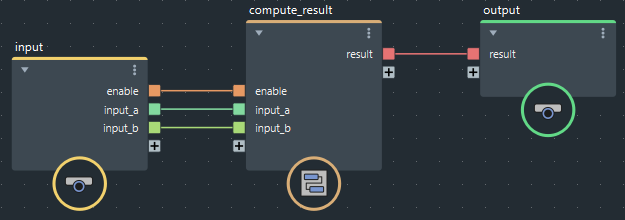
Any type that is natively understood by Maya is supported as a graph input or output, including Booleans, integers, floating-point values, vectors, and matrices. Enums and specialized objects like function curves are not supported.
Input values appear in Maya's Attribute Editor, in the graph node's Extra Attributes section.
To use an output value, connect it to another Maya node in the Node Editor. You can also connect input values in the same way.
Array inputs
If you wish, you can use an array of values from the scene as an input to the graph. For example, it may be convenient to represent a hierarchy of arbitrary depth as an array of matrices.
- At the top level of the graph, create an input port whose type is an array of the desired kind.
- In Maya's Node Editor, connect the individual values that make up the array.
Note that in Maya, the last port in the array is a dummy that allows you to connect additional values. In the image below, the input array has a size of three.
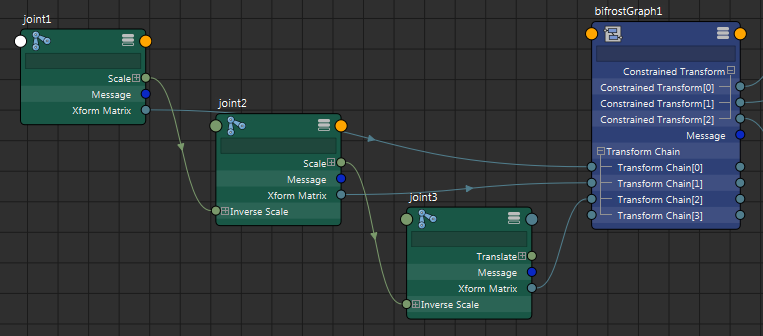
You can use the values of an array output from the graph in the same way, by connecting the ports in Maya's Node Editor. In some circumstances, a dummy output might appear as the last element of an array output — the values of ports beyond the actual size of the array are the default value of the type.
You can connect 2D arrays (arrays of arrays) and 3D arrays in a similar manner. Once again, there are dummy ports that allow for new connections. The following example shows a 2D array with 2 arrays of 2 elements each.
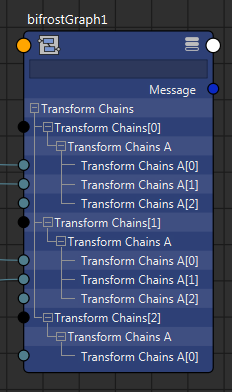
The extra level in the tree is required because Maya does not support multidimensional arrays natively.