AWS Virtual Private Cloud Configurations
The Virtual Private Cloud (VPC) allows you to network Flame instances, a project server, and Burn nodes together in your cloud implementation.
This topic lists minimum requirements. Adapt these to your own deployment to implement an operational security that matches your environment.
Network & Security
To have Flame Family services run across your Virtual Private Cloud (VPC), you need to define Security Groups and open ports and port ranges. You want to create these security groups:
- Flame Family products
- (optional) Elastic Fabric Adapter for use with CDI
- Burn
- Project Server
- IGMP-multicast
You also need to create a security group for your remote streaming protocol solution. See the HP Anyware and the AWS NICE DCV pages for their respective groups.
You create the VPC security groups in VPC > Security > Security Groups.
In the following tables, CIDR stands for the IPv4 CIDR of your VPC. You get it from your AWS console, VPC > Your VPCs > IPv4 CIDR.
Flame Family products security group flame
Inbound rules only. Use the default outbound rules.
| IP Version | Type | Protocol | Port Range | Source | Description |
|---|---|---|---|---|---|
| IPv4 | Custom TCP | TCP | 3234 | CIDR | Backburner Manager |
| IPv4 | Custom TCP | TCP | 3230 - 3233 | CIDR | Backburner Server |
| IPv6 | SSH | TCP | 22 | ::/0 | – |
| IPv4 | Custom TCP | TCP | 7184 | CIDR | WireTapGateway Frame Interface |
| IPv4 | Custom UDP | UDP | 32768 - 60999 | CIDR | /proc/sys/net/ipv4/ip_local_port_range |
| IPv4 | Custom UDP | UDP | 20048 | CIDR | RPC mountd |
| IPv4 | Custom TCP | TCP | 7700 | CIDR | DLmpd |
| IPv4 | Custom TCP | TCP | 7348 | CIDR | Backburner Manager WT Data |
| IPv4 | Custom TCP | TCP | 7549 | CIDR | IFFFSWireTapServer Node Interface |
| IPv4 | Custom UDP | UDP | 111 | CIDR | RPC Portmapper |
| IPv6 | HTTPS | TCP | 443 | ::/0 | – |
| IPv4 | HTTPS | TCP | 443 | 0.0.0.0/0 | – |
| IPv4 | Custom TCP | TCP | 32768 - 60999 | CIDR | Dynamic ports |
| IPv4 | Custom TCP | TCP | 7550 | CIDR | IFFFSWireTapServer Frame Interface |
| IPv4 | Custom UDP | UDP | 30000 | CIDR | Backburner Manager |
| IPv4 | Custom UDP | UDP | 7555 | CIDR | WireTap Service Discovery |
| IPv4 | Custom TCP | TCP | 7347 | CIDR | Backburner Manager WT Meta |
| IPv4 | Custom UDP | UDP | 7001 | CIDR | S+W Probed Multicast |
| IPv4 | Custom UDP | UDP | 3234 | CIDR | Backburner Manager |
| IPv4 | Custom TCP | TCP | 20048 | CIDR | RPC mountd |
| IPv4 | Custom ICMP - IPv4 | Echo Request | N/A | 0.0.0.0/0 | ping |
| IPv4 | SSH | TCP | 22 | 0.0.0.0/0 | – |
| IPv4 | Custom TCP | TCP | 111 | CIDR | RPC portmapper |
| IPv4 | NFS | TCP | 2049 | CIDR | NFS |
| IPv4 | Custom TCP | TCP | 7183 | CIDR | WireTapGateway Node Interface |
| IPv4 | Custom TCP | TCP | 7000 | CIDR | S+W Server |
Elastic Fabric Adapter (EFA) Security Group
If you plan on using AWS CDI, you must enable EFA on Flame instances you will create. This requires creating an EFA-specific security group. Follow these steps to create one.
- In the AWS console, under the EC2 service, select Security Groups under Network & Security.
- Click Create security group.
- Give a descriptive name to your security group, eg Flame EFA SG, and enter a description.
- Click Create security group.
- On the new page that appears, copy the Security Group ID (sg-###) of your security group.
- Click Edit inbound rules, then Add rule.
- For type, select All traffic, select Custom for Source, then paste the Security group ID from the previous step in the source address box.
- Click Save rule.
- Select the Outbound rules tab, then Edit outbound rules.
- For type, select All traffic, select Custom for Source, then paste the Security group ID from the previous step in the source address box
- Click Save rule.
Burn security group
Inbound rules only. Use the default outbound rules.
| IP Version | Type | Protocol | Port Range | Source | Description |
|---|---|---|---|---|---|
| IPv4 | Custom UDP | UDP | 32768 - 60999 | CIDR | /proc/sys/net/ipv4/ip_local_port_range |
| IPv4 | Custom TCP | TCP | 3233 | CIDR | Backburner Server |
| IPv4 | Custom TCP | TCP | 7700 | CIDR | DLmpd |
| IPv4 | Custom TCP | TCP | 32768 - 60999 | CIDR | Dynamic ports |
| IPv4 | Custom ICMP - IPv4 | Echo Request | N/A | 0.0.0.0/0 | ping |
| IPv4 | Custom TCP | TCP | 7001 | CIDR | S+W Probed |
| IPv4 | Custom UDP | UDP | 7001 | CIDR | S+W Probed Multicast |
| IPv4 | SSH | TCP | 22 | 0.0.0.0/0 | SSH |
Project Server security group
Inbound rules only. Use the default outbound rules.
| IP Version | Type | Protocol | Port Range | Source | Description |
|---|---|---|---|---|---|
| IPv4 | Custom TCP | TCP | 7549 | CIDR | IFFFS WireTap Server (Node) |
| IPv4 | Custom UDP | UDP | 32768 - 60999 | CIDR | /proc/sys/net/ipv4/ip_local_port_range |
| IPv4 | Custom TCP | TCP | 111 | CIDR | RPC portmapper (TCP) |
| IPv4 | Custom TCP | TCP | 3234 | CIDR | Backburner Manager |
| IPv4 | Custom TCP | TCP | 8244 | CIDR | S+W Probed Remote Locking |
| IPv4 | Custom ICMP - IPv4 | Echo Request | N/A | 0.0.0.0/0 | ping |
| IPv4 | Custom TCP | TCP | 7000 | CIDR | S+W Server |
| IPv4 | Custom UDP | UDP | 111 | CIDR | RPC Portmapper (UDP) |
| IPv4 | NFS | TCP | 2049 | CIDR | NFS |
| IPv4 | Custom TCP | TCP | 7348 | CIDR | Backburner Manager WT Data |
| IPv4 | Custom TCP | TCP | 7700 | CIDR | DLmpd |
| IPv4 | Custom TCP | TCP | 20048 | CIDR | NFS Mountd (TCP) |
| IPv4 | Custom UDP | UDP | 3234 | CIDR | Backburner Manager |
| IPv4 | Custom TCP | TCP | 7347 | CIDR | Backburner Manager WT Meta |
| IPv4 | Custom TCP | TCP | 32768 - 60999 | CIDR | Dynamic ports |
| IPv4 | Custom UDP | UDP | 30000 | CIDR | Backburner Manager |
| IPv4 | Custom UDP | UDP | 7555 | CIDR | WireTap Service Discovery |
| IPv4 | Custom TCP | TCP | 7428 | CIDR | S+W Bandwidth Manager |
| IPv4 | Custom TCP | TCP | 7001 | CIDR | S+W Probed |
| IPv4 | Custom UDP | UDP | 20048 | CIDR | NFS Mountd (UDP) |
| IPv4 | Custom UDP | UDP | 7001 | CIDR | S+W Probed Multicast |
| IPv4 | SSH | TCP | 22 | 0.0.0.0/0 | SSH |
NAS security group
Inbound rules only. Use the default outbound rules.
| IP Version | Type | Protocol | Port Range | Source | Description |
|---|---|---|---|---|---|
| IPv4 | Custom TCP | TCP | 20048 | CIDR | NFS Mountd (TCP) |
| IPv4 | Custom UDP | UDP | 111 | CIDR | RPC Portmapper (UDP) |
| IPv4 | SSH | TCP | 22 | ::/0 | SSH |
| IPv4 | Custom ICMP - IPv4 | Echo Request | N/A | 0.0.0.0/0 | ping |
| IPv4 | Custom UDP | UDP | 20048 | CIDR | NFS Mountd (UDP) |
| IPv4 | NFS | TCP | 2049 | CIDR | NFS |
| IPv4 | SSH | TCP | 22 | 0.0.0.0/0 | SSH |
| IPv4 | Custom TCP | TCP | 111 | CIDR | RPC portmapper (TCP) |
| IPv4 | Custom ICMP - IPv4 | Echo Request | N/A | ::/0 | ping |
IGMP-multicast
Inbound rules
| IP Version | Type | Protocol | Port Range | Source | Description |
|---|---|---|---|---|---|
| IPv4 | All UDP | UDP | 0-65535 | CIDR | Inbound multicast traffic |
| IPv4 | All traffic | All | All | CIDR | All inbound VPC traffic |
| IPv4 | IGMP (2)* | IGMP (2)** | All | 0.0.0.0/32 | IGMPv2 autodiscovery |
* When adding the rule to the security group, select the type "Custom Protocol" from the drop-down.
** When adding the rule to the security group, type '2' in the protocol text field.
Outbound rules
| IP Version | Type | Protocol | Port Range | Source | Description |
|---|---|---|---|---|---|
| IPv4 | All UDP | UDP | 0-65535 | 239.0.0.1/32 | Outbound multicast traffic |
| IPv4 | All traffic | All | All | CIDR | All outbound VPC traffic |
| IPv4 | IGMP (2)* | IGMP (2)** | All | 239.0.0.1/32 | IGMPv2 join |
| IPv4 | IGMP (2)* | IGMP (2)** | All | 224.0.0.2/32 | IGMPv2 leave |
* When adding the rule to the security group, select the type "Custom Protocol" from the drop-down.
** When adding the rule to the security group, type '2' in the protocol text field.
Set Up an AWS Transit Gateway
To support the various networking capabilities of Flame Family products, you need to configure Transit Gateway service on your instances.
AWS Local Zones do not currently support TGW or TGW-mc. Please express your interest in these features to AWS directly.
You could edit the framestore map to enable Wire between Flame instances on your VPC, but a Transit Gateway enables Wire without editing the framestore map. In short, a Transit Gateway allows you to use the self-discovery capabilities of Autodesk Flame services.
If you plan on setting up a Transit Gateway for your VPC, AWS already has detailed documentation on the Transit Gateway and its configuration.
Transit Gateway uses a subnet in each availability zone (AZ) used by your Virtual Private Cloud (VPC). You only need to attach the subnets in your VPC where you provision a Flame instance. If there is a subnet (AZ) that you won’t be using, then you don't need to attach it to your TGW.
The following steps provide an overview of the process to set up a Transit Gateway, with the options required to make it work with a Flame-based workflow. For detailed operation and settings information, refer to the AWS documentation.
To set up a Transit Gateway, you use the AWS Console > VPC menu. Down the left menu, open Transit Gateways.
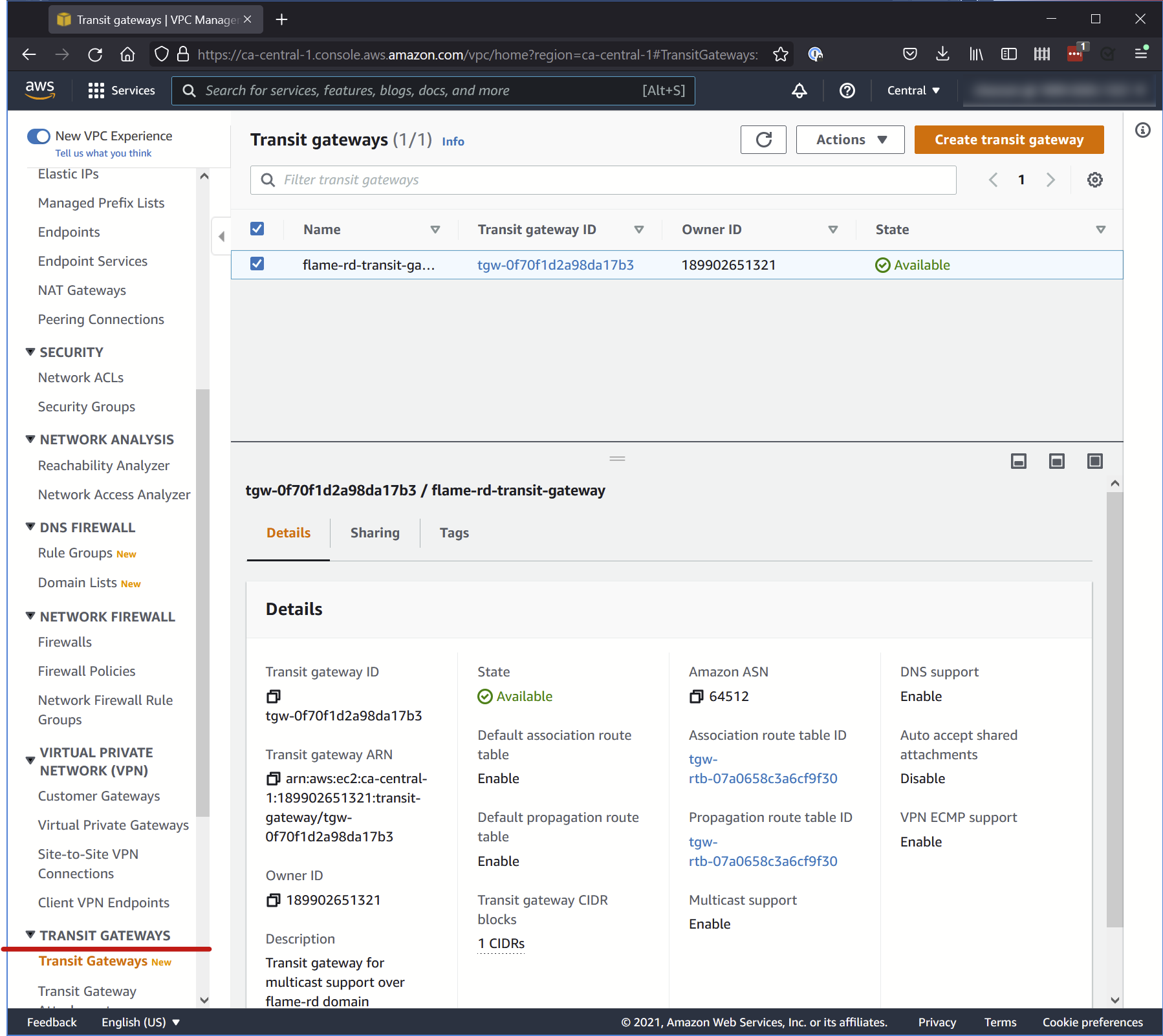
To set up a Transit Gateway, you need to open and set up the different sections in the following order:
- Transit Gateways
- Transit Gateway Attachments
- Transit Gateway Route Table
- Transit Gateway Multicast
1. Transit Gateways
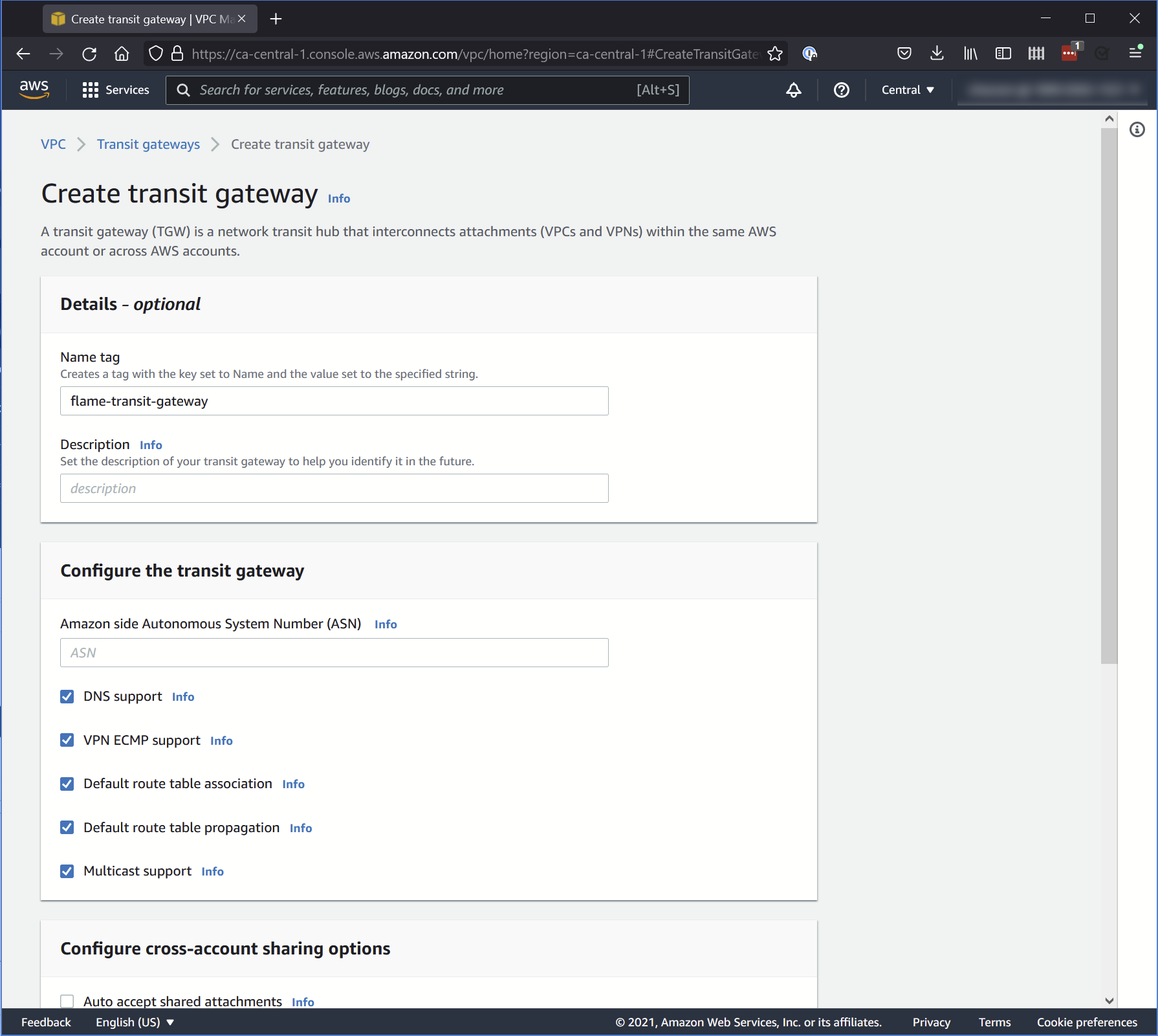
Where you create the Transit Gateway. Make sure to select the following options:
- DNS support
- Default route table association
- Default route table propagation
- Multicast support
When you create a Transit Gateway, every option is enabled by default except Multicast support. Make sure to enable it.
You can leave Auto accept shared attachments deselected.
2. Transit Gateway Attachments
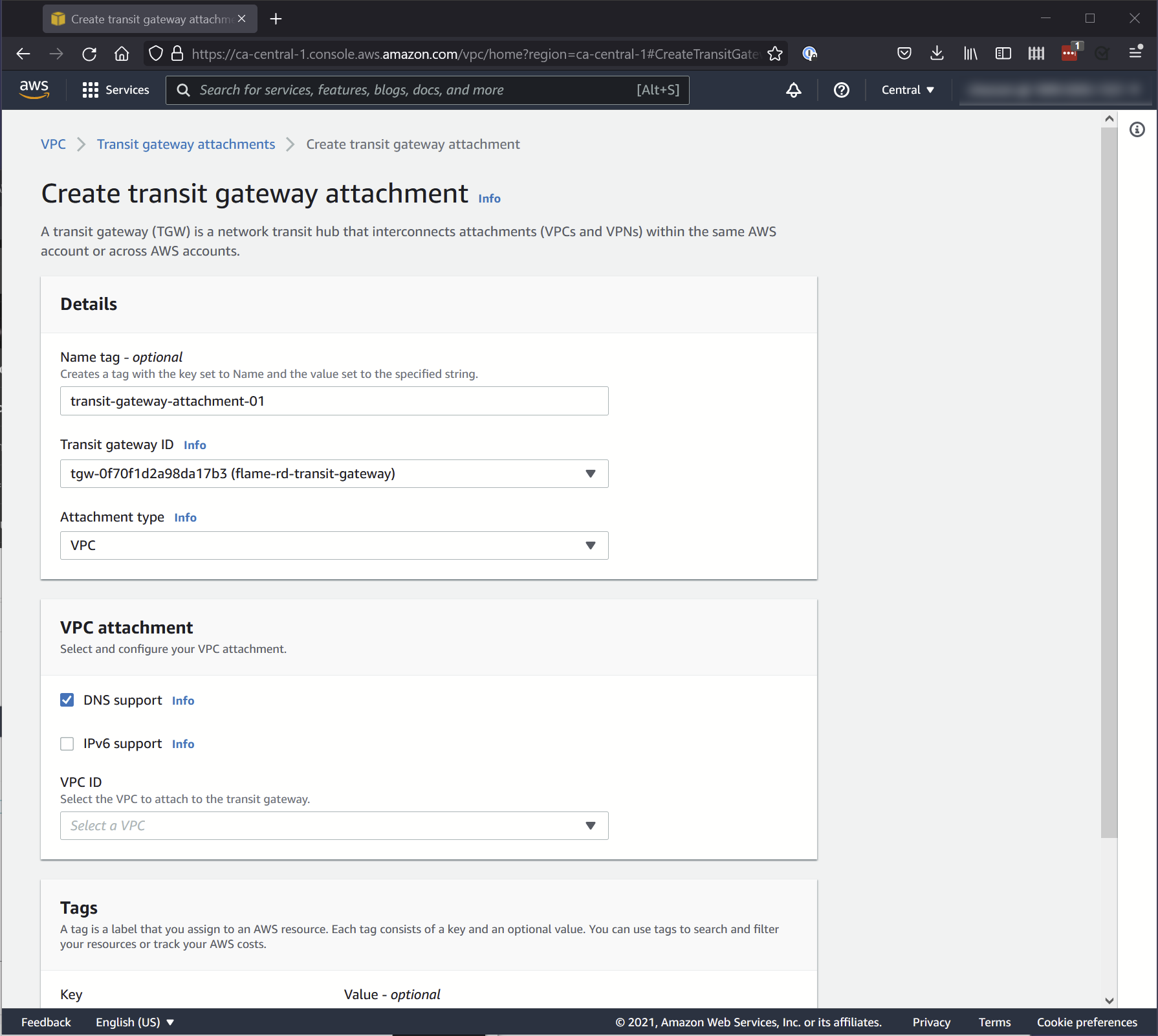
Where you attach your Transit Gateway to your Virtual Private Cloud (VPC).
Set the following options:
Details
- Transit Gateway ID: The Transit Gateway you created.
- Attachment Type: VPC
VPC attachment
- DNS Support: Selected
- IPv6: Unselected
- VPC ID: The ID of your VPC
3. Transit Gateway Route Tables
Where the routing tables are created.
You do not have any options to set in this menu: it is automatically generated when you create your Transit Gateway attachment.
4. Transit Gateway Multicast
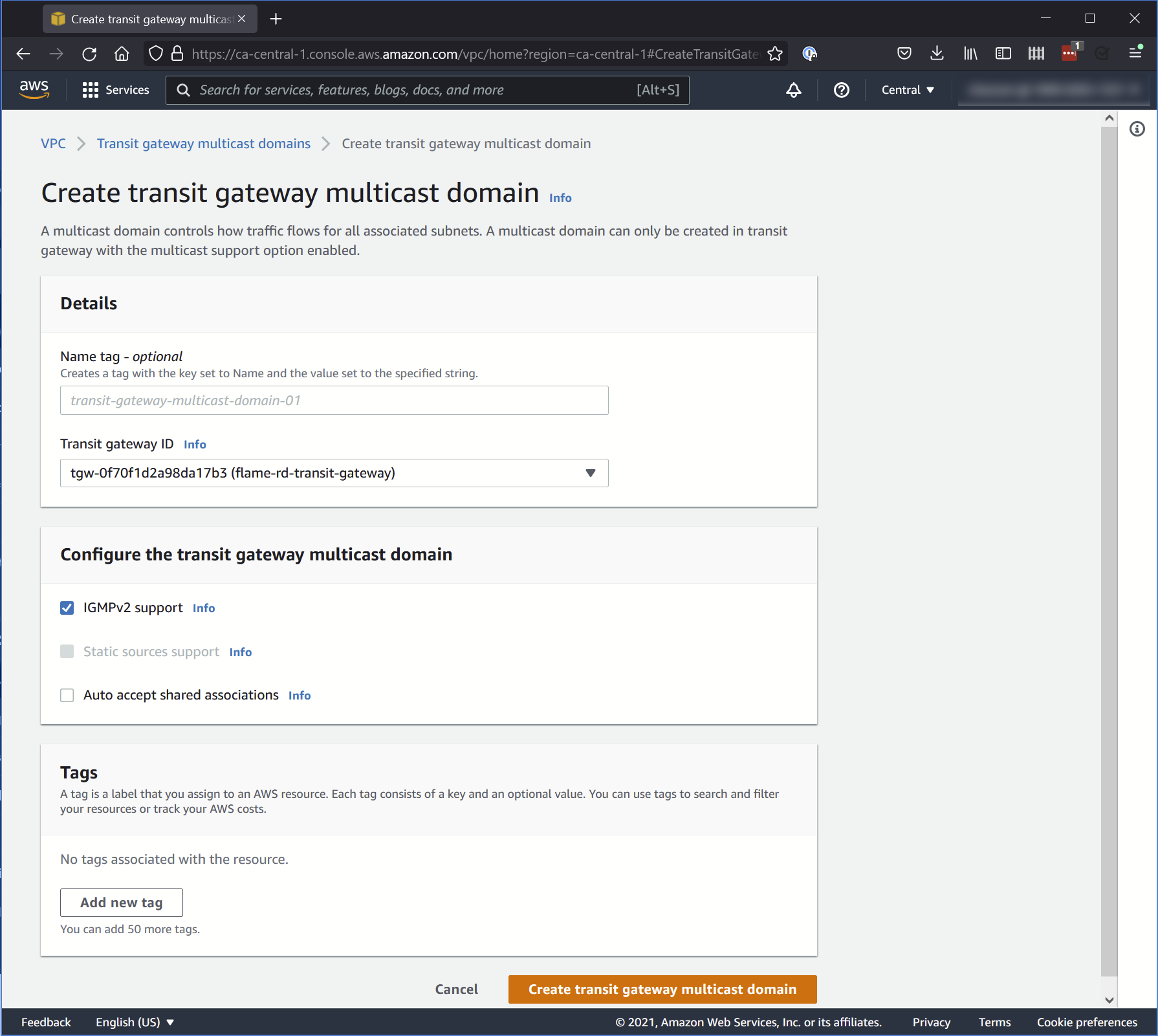
Where you set how traffic flows for all associated subnets.
Set the following options:
Details
- Transit Gateway ID: The Transit Gateway you created.
Configure the Transit Gateway multicast domain
- IGMPv2 support: Selected
- Auto accept shared associations: Unselected
You must also associate your VPC subnets to your Transit Gateway multicast domain. This constrains the multicast to only the subnets that require it. Your subnets are listed in Virtual Private Cloud > Subnets. Every Flame instance part of the same Wire/Backburner network must be in a subnet associated to the same Transit Gateway multicast domain.