Use the Resolution box to select a preset resolution.
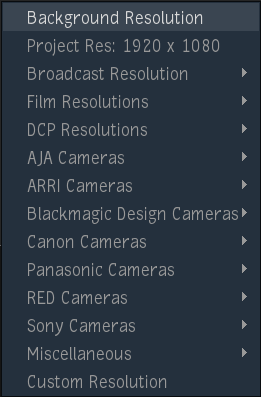
- Background Resolution Only available within Action or with an Action node selected. Sets the resolution to the background resolution of Action.
- Project Res Sets the resolution to the resolution of the project. You set the resolution of the project when you create it. You can change your project resolution in .
- Resolutions for Broadcast, Film, DCP, and popular cameras manufacturers.
- Custom Resolution Use this option to enter a customized resolution.
Customizing the Resolution Box
The resolutions displayed in the Resolution box are listed in /opt/Autodesk/cfg/resolutions.cfg. This file is read-only, and is used by all Flame Family products on the workstation. It's also file is overwritten every time you install a new Flame Family product.
To add custom resolutions to the Resolution box:
- Open
/opt/Autodesk/cfg/resolutions_custom.cfg.
You need to open the file as root to edit it.
- Also open
/opt/Autodesk/cfg/resolutions_custom.cfg.examples.
This file contains simple examples of what can be done in resolutions_custom.cfg, and how to do it.
- Edit
resolutions_custom.cfg. You can add, group, and name your favorite resolutions in it.
Note: resolutions_custom.cfg uses the JSON file format. It relies on { }, [ ] and line feeds, and it's easy to get lost in the syntax. To avoid this, you should edit it with a text editor that understands JSON files. You'll have to find one online.
Only edit resolutions_custom.cfg. It will not be overwritten by future versions of a Flame Family product. And if you make mistakes in the formatting, Flame simply ignores it and displays the Resolution box without your custom resolutions.
Specifying Aspect Ratios
Starting with Flame Family 2021.2 Update, aspect ratio for square pixel resolutions are no longer required.
| Pre-2021.2 Resolution Definition | Updated Resolution Definition |
|---|---|
{
"name": "HD 1080 16:9 (1920 x 1080)",
"width": 1920,
"height": 1080,
"aspectRatio": 1.777778
}
|
{
"name": "HD 1080 16:9 (1920 x 1080)",
"width": 1920,
"height": 1080,
}
|
If you must specify a pixel aspect ratio, you can set the PAR parameter.
| Pre-2021.2 Custom Pixel Aspect Ratio Definition | Updated Custom Pixel Aspect Ratio Definition |
|---|---|
{
"name": "BMD 3K 4:3 Ana 2.0x (3072 x 2560)",
"width": 3072,
"height": 2560,
"aspectRatio": 2.4
}
|
{
"name": "BMD 3K 4:3 Ana 2.0x (3072 x 2560)",
"width": 3072,
"height": 2560,
"PAR": 2.4
}
|
RES_POPUP: skipping resolution: BMD 4K 4:3 Ana 1.3x (2560 x 2136).
You can safely ignore these errors.