An object can be selected, deleted, edited, and transformed until it is tacked down on the image. As soon as it is tacked down, the object becomes part of the image and can no longer be manipulated.
There are several ways to tack down an object:
- Select a Tack mode so that an object is either tacked down as soon as it is drawn or as soon as the next object is drawn.
- Tack down selected objects only.
- Tack down all objects simultaneously using the Tack All command.
Tack Modes
The Tack mode is selected with the Tack Mode box in the Rendering Setup menu.
- In the Paint tool, click Setup. The Setup menu appears.
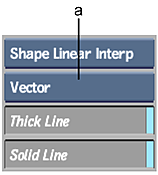
(a) Tack Mode box
- In the Rendering area, select an option from the Tack Mode box.
Select: To: Vector Explicitly tack down the objects using the Tack command. Edit Last Edit the last object drawn until the next object is added to the image. As soon as the next object is added, the last object is tacked down. Raster Tack down an object as soon as it is added to the image.
Tacking Down Selected Objects
When the Tack mode is set to Vector, objects must be explicitly tacked down on the image using the Tack button.
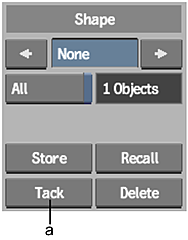
(a) Tack button
To tack down one or more objects:
- Select the objects you want to tack down.
- Click Tack. All selected objects are tacked down on the image.
To tack down all objects on the image:
- In the Graphics menu, Enable All.
- Click Tack.
All objects are tacked down on the image.