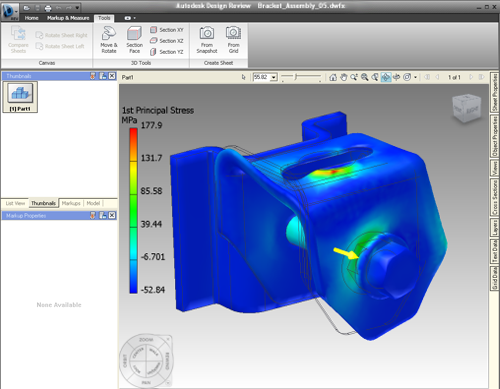
- Result type
- Color bar
- Color mapping on the part
- Undeformed part represented in wireframe
Anyone can use published DWF files, even without installing Autodesk Inventor. DWF files are highly compressed, fast to open, and you can share them by email.
Publishing from Autodesk Inventor creates a DWF file that maintains design data such as lineweights, scale, and mass properties for 2D and 3D files. Both 2D and 3D data can be included in one file. You can also publish Stress Analysis volume plots.
- In the simulation browser, select the simulation result to export, such as Von Mises Stress, Displacement, or a mode shape from a modal analysis. The stress analysis results display the model in various colors according to the intensity of the applied forces and constraints. The result displays.
Use the display commands to create the view you want to export to DWF. For example, you can specify the number of colors for the stress contours, and define a maximum and minimum threshold values using the color bar settings.
- On the ribbon, click File
 ExportExport to DWF. Alternatively, you can click File Save as
Save copy as and select DWFx as the file type.
ExportExport to DWF. Alternatively, you can click File Save as
Save copy as and select DWFx as the file type.
- In the part or assembly environment, the appropriate dialog box opens. Set the publishing options. Click
Express.
Note: Currently, the Complete and Custom options are not supported for outputting simulation results.
- Click
Publish to close the dialog box and open the Publish Document to DWF dialog box. Specify the DWF file name and folder.
Note: Click Options to display the Publish Document dialog box and enter any changes.
- Click Save to generate DWF file.
In the simulation browser bar, select and display the results that you want to view or print in Autodesk Design Review.
The current state of the part or assembly model is published in the DWF file. Not all analysis types are published, only the active type shown on the screen at the time of publishing.