Full Navigation Wheels
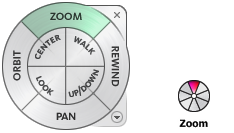
The Full Navigation wheels (big and mini) contain common 3D navigation tools used for both viewing an object and touring a building. The big and mini Full Navigation wheels are optimized for experienced 3D users.
Note: When one of the Full Navigation wheels is displayed, you can press and hold the middle mouse button to pan, scroll the wheel button to zoom in and out, and hold the SHIFT key while pressing and holding the middle mouse button to orbit the model.
Big Full Navigation Wheel
The big Full Navigation wheel wedges have the following options:
- Zoom. Adjusts the magnification of the current view.
- Rewind. Restores the most recent view. You can move backward or forward by clicking and dragging left or right.
- Pan. Repositions the current view by panning.
- Orbit. Rotates the current view around a fixed pivot point.
- Center. Specifies a point on a model to adjust the center of the current view or change the target point used for some of the navigation tools.
- Walk. Simulates walking through a model.
- Look. Swivels the current view.
- Up/Down. Slides the current view of a model along the Z axis of the model.
To switch to the big Full Navigation wheel:
- Right-click the wheel, and click Full Navigation Wheel.
Toolbar: Navigation bar > SteeringWheels > Full Navigation Wheel
Ribbon: Viewpoint tab > Navigate panel > Steering Wheels > Full Navigation 
Mini Full Navigation Wheel
The mini Full Navigation wheel wedges have the following options:
- Zoom (Top wedge). Adjusts the magnification of the current view.
- Walk (Upper right wedge). Simulates walking through a model.
- Rewind (Right wedge). Restores the most recent view. You can move backward or forward by clicking and dragging left or right.
- Up/Down (Lower right wedge). Slides the current view of a model along the Z axis of the model.
- Pan (Bottom wedge). Repositions the current view by panning.
- Look (Lower left wedge). Swivels the current view.
- Orbit (Left wedge). Rotates the current view around a fixed pivot point.
- Center (Upper left wedge). Specifies a point on a model to adjust the center of the current view or change the target point used for some of the navigation tools.
To switch to the mini Full Navigation wheel:
- Right-click the wheel, and click Advanced Wheels>Mini Full Navigation Wheel.
Toolbar: Navigation bar > SteeringWheels > Mini Full Navigation Wheel
Ribbon: Viewpoint tab > Navigate panel > Steering Wheels > Mini Full Navigation 