If the Use Axial Thickness option is selected on the Component Thickness dialog, you can use the following options to apply radial or axial thickness to the tool:
 — Click the
Thickness
— Click the
Thickness
 button to separate the
Thickness
box in to
Radial thickness
button to separate the
Thickness
box in to
Radial thickness
 Axial thickness
 . Use these to specify separate
Radial and
Axial thickness values
. Use these to specify separate
Radial and
Axial thickness values
 .
.
- Thickness — Enter the offset to the tool in all directions.

- Radial thickness — Enter the radial offset to the tool. When 2.5-axis or 3-axis machining, a positive value leaves material on vertical walls.
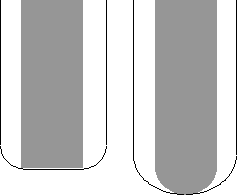
- Axial thickness — Enter the offset to the tool, in the tool axis direction only. When 2.5-axis or 3-axis machining, a positive value leaves material on horizontal faces.

Variable thickness (separate Radial and Axial thickness values) is useful for orthogonal parts. You can use variable thickness on sloping walled parts, although it is more difficult to predict the results.
- In thin-walled aerospace parts, use the area clearance toolpath to finish the floor of the pocket, but leave material on the thin vertical walls by specifying a positive
Radial thickness
value and an
Axial thickness
of
0:

 Radial thickness
- Alternatively, to finish steep side walls and leave material on the bottom, specify a
Radial thickness
of
0 and a positive
Axial thickness value:

 Axial thickness
Typically, variable thickness is used on flat-bottomed parts with pockets.