Specifies which tables have callout annotations and their corresponding settings.
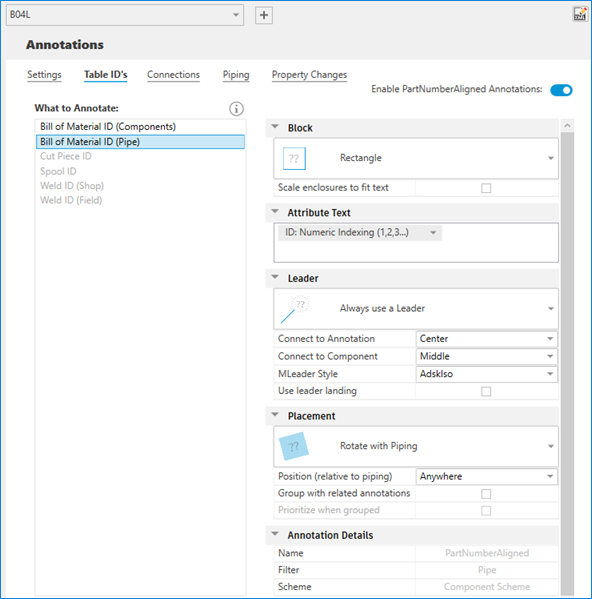
Enable <Type> Annotations
Controls the display of the annotation.
Block
Specifies the shape of the enclosure, circle, rectangle, diamond, hexagon, or oval. You can also choose not to have any enclosure.
- Scale Enclosures to Fit Text
- Expands graphics to accommodate annotation text. Some enclosure symbols always expand.
Attribute Text
Specifies whether ID numbering is alphabetic or numeric. You can customize the prefix or suffix of the annotation. For example, you can enter square brackets, diamond brackets, round brackets, or text directly.
Note:
- Spool number is defined in Iso Style Setup page in Project Setup.
- You can also specify a weld ID from the weld number property which is defined in the 3D model.
Leader
Specifies whether a leader line connects the object to its annotation, with or without an arrow. You can also choose never to use a leader.
- Connect to Annotation
- Specifies the leader line to connect to the corner, middle, or center of the annotation.
- Connect to Component
- Specifies the leader line to connect to the middle or end of the component.
- MLeader Style
- Specifies which multileader style is used.
- Use Leader Landing
- Specifies whether to use leader landing.
Placement
Displays annotations to be always horizontal, rotate with piping, or to show in iso plane.
- Position (relative to piping)
- Specifies the annotation is placed above or below the piping, or anywhere.
- Group with Related Annotations
- Specifies whether to group annotation with the related annotations.
- Prioritize when Grouped
- Specifies whether to prioritize current annotation when all annotations are grouped together.
Grouped Components
Manages the annotations in the component group.
- All annotations in one block. Specifies whether to place all annotations of the same component in one block.
- You can add, remove, enable, or disable the component group.
- You can add, remove, or reorder the components in the group.
- You can add prefix or suffix to the components.