Vault 2020.1 update brings many enhancements to the already existing features and workflows based on your suggestions, as well as new improvements.
Enhancements to CAD and Vault workflows
-
With this update you are now able to open the DWG file with the application it was created. Open the drawing file using the right-click menu, and the respective CAD application opens.
Also, files are opened depending on the preferences specified in the “Open File Behaviors” dialog box.
-
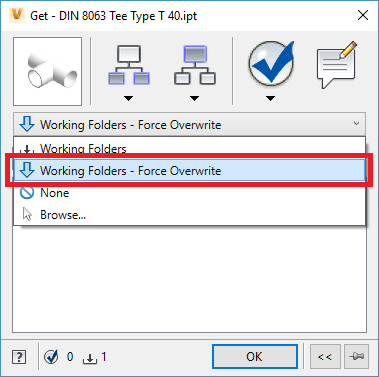
With a simple setting, you are now able to control that you get the latest version of the file. It means that even when you have a newer version of a file in your local computer than is a version of the file in vault, the latest version opens by default. Select the "Working Folders - Force Override" option in the Get dialog box and it remains selected until you change the setting ensuring that you can always get the latest version of the file.
-
We moved the “Options” to the top and made it available in the Collapsed state of this dialog.
-
We also made the last selected Option as sticky. That way if “Force Overwrite” is chosen then this option will be default till it is changed
-
-
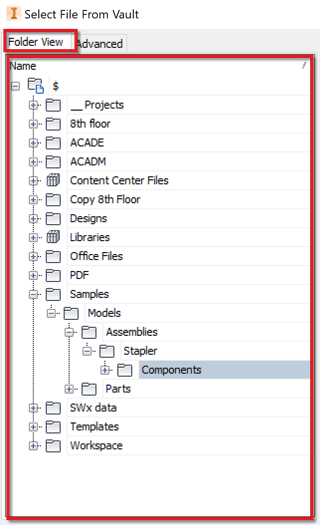
With this update Open from Vault dialog shows Folder View as well, which helps with easy navigation of the files.

General Enhancements
-
The Find dialog box is now fully expandable which helps to view the search result in a full screen and helps when you have multiple screens open.

-
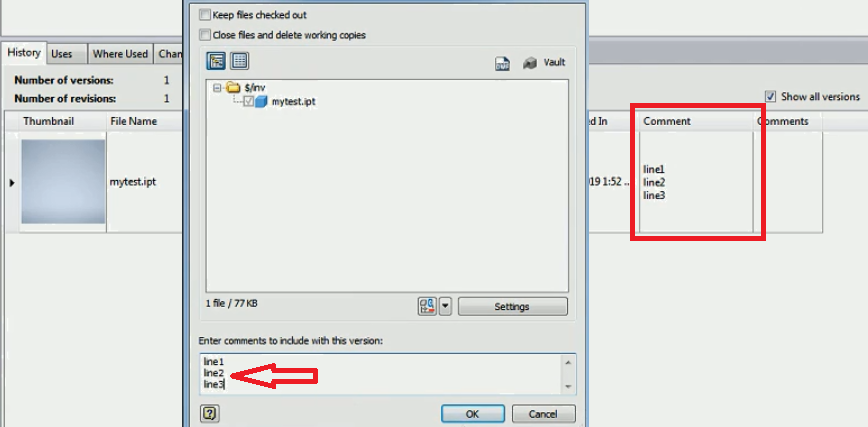
Comments section now supports multi-line commenting. This applies to various dialog boxes, such as Check-in dialog box, Properties, or Change State.
Until now when you added multiline comments to the dialog boxes such as Check-in or Change state, the comments were displayed in the single line in Vault Client. The “Comments” were shown as single line in Vault Client. With this update, your comments in multiple lines are also reflected in Vault Client.
-
If a list of items has several pages and you select an item not located on the first page, after Refresh that particular item remains selected, is displayed on the first page and also updated.
-
When you open a new instance of Vault Client, the last visited folder is opened.
-
During the process of assigning or updating Items, ownership of associated items is required to complete the process. In the past, the constant change of ownership or requiring ownership and not being able to obtain ownership can prevent the operation to complete. With 2020.1 update, now ownership is required only for 'out-of-date' child items.