You enter points and select objects in the current viewport. To make a viewport current, use the ActiveViewport property.
You can iterate through existing viewports to find a particular viewport. To do this, first identify the name of the viewport configuration on which the desired viewport resides using the Name property. Additionally, if the viewport configuration has been split, each individual viewport on the configuration can be identified through the LowerLeftCorner and UpperRightCorner properties.
The LowerLeftCorner and UpperRightCorner properties represent the graphic placement of the viewport on the display. These properties are defined as follows (using a four-way split as an example):
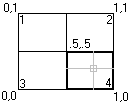
In this example:
- Viewport 1: LowerLeftCorner = (0, .5), UpperRightCorner = (.5, 1)
- Viewport 2: LowerLeftCorner = (.5, .5), UpperRightCorner = (1, 1)
- Viewport 3: LowerLeftCorner = (0, 0), UpperRightCorner = (.5, .5)
- Viewport 4: LowerLeftCorner = (.5, 0), UpperRightCorner = (1, .5)
Split a viewport, then iterate through the windows
This example splits a viewport into four windows. It then iterates through all the viewports in the drawing and displays the viewport name and the lower-left and upper-right corner for each viewport.
- AutoLISP
-
(vl-load-com) (defun c:Ch3_IteratingViewportWindows() (setq acadObj (vlax-get-acad-object) doc (vla-get-ActiveDocument acadObj)) ;; Create a new viewport and make it active (setq viewportsCollection (vla-get-Viewports doc) vportObj (vla-Add viewportsCollection "TEST_VIEWPORT")) (vla-put-ActiveViewport doc vportObj) ;; Split vport into 4 windows (vla-Split vportObj acViewport4) ;; Iterate through the viewports, ;; highlighting each viewport and displaying ;; the upper right and lower left corners ;; for each. (vlax-for vport viewportsCollection (vla-put-ActiveViewport doc vport) (setq LLCorner (vlax-safearray->list (vlax-variant-value (vla-get-LowerLeftCorner vport))) URCorner (vlax-safearray->list (vlax-variant-value (vla-get-UpperRightCorner vport)))) (alert (strcat "Viewport: " (vla-get-Name vport) " is now active." "\nLower left corner: " (rtos (nth 0 LLCorner) 2) ", " (rtos (nth 1 LLCorner) 2) "\nUpper right corner: " (rtos (nth 0 URCorner) 2) ", " (rtos (nth 1 URCorner) 2))) ) ) - VBA (AutoCAD Only)
-
Sub Ch3_IteratingViewportWindows()
  ' Create a new viewport and make it active
  Dim vportObj As AcadViewport
  Set vportObj = ThisDrawing.Viewports.Add("TEST_VIEWPORT")
  ThisDrawing.ActiveViewport = vportObj

  ' Split vport into 4 windows
  vportObj.Split acViewport4

  ' Iterate through the viewports,
  ' highlighting each viewport and displaying
  ' the upper right and lower left corners
  ' for each.
  Dim vport As AcadViewport
  Dim LLCorner As Variant
  Dim URCorner As Variant
  For Each vport In ThisDrawing.Viewports
    ThisDrawing.ActiveViewport = vport
    LLCorner = vport.LowerLeftCorner
    URCorner = vport.UpperRightCorner
    MsgBox "Viewport: " & vport.Name & " is now active." & _
    vbCrLf & "Lower left corner: " & _
    LLCorner(0) & ", " & LLCorner(1) & vbCrLf & _
    "Upper right corner: " & _
    URCorner(0) & ", " & URCorner(1)
  Next vport
End Sub