Use the Create Point-Alignment Table command to create a table that lists the location of COGO points as offsets of stations along the specified alignments.
- In the Toolspace, on the Toolbox tab, expand Miscellaneous Utilities
 SHP Import/Export Utilities Point Tables. Double-click Create Point-Alignment Table.
- In the
Create Report dialog box, select the settings that you want to use for the new table.
The Table Preview pane shows the default template. The default structure will report the location of COGO points relative to the alignment(s) you specify.
You can design a new table structure or revise an existing one in the Report Setting dialog box.
- Click
 to open the
Report Setting dialog box.
to open the
Report Setting dialog box.
- In Setting name, name the new setting.
- In Table title, name the new table. The name will appear at the top of the table that you place in the drawing.
- In Structure, edit the default table structure. To add new data elements to the table, see To Edit a Point-Alignment Table and Report Setting Dialog Box.
- In the Create Reports dialog box, select the alignment(s). The pull-down menu lists the alignments in the current drawing.
- Select the COGO points that you want to include in the table.
- Manual selection: Click
 and then select one or more COGO points in the current drawing.
- Point group selection: Click
 to open the
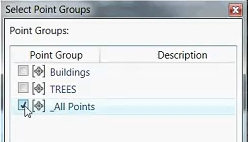
Select Point Groups dialog box. Select the point groups you want to include.
to open the
Select Point Groups dialog box. Select the point groups you want to include.
- Manual selection: Click
- Click Place Table to insert the table in the drawing.