 Mesh to Surface
Adds a measurement showing the minimum and maximum deviation between a mesh and a surface. This tool creates a locator showing the deviation between the two objects, labeling the minimum and maximum.
Objects in reference layers can be selected from within this tool.
Access this tool from the Locators palette:

Mesh to Surface Deviation Options
Show Min / Show Max / Show Comb
Check/uncheck the boxes to turn the labels and comb on or off.
The labels can also be toggled on/off from the Information Window.
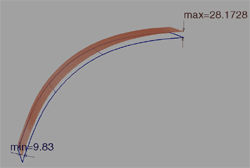
When Show Comb is on, you can right-click a comb sample in the viewport to display the deviation value at that point. See Display deviation values in the viewport.
Note: Use the Min Comb Density control in the Deviation tab of the Control Panel to set the minimum increment size of the comb samples when adjusting the comb in the canvas using the middle-mouse button (MMB). See Min Comb Density (MMB)