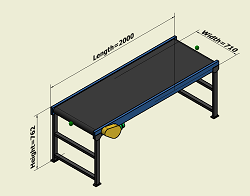
Straight Segment Settings
- Select an asset to represent the straight segment of the asset chain.
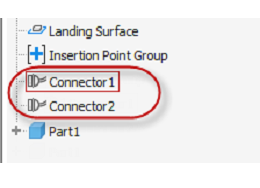
- Name the Start and End connectors. The names must match the names as they appear in the Inventor Model Browser.
- Set up the parameter mapping between the segment and the model.
Asset
- Click Select Asset.
- Select the asset that represents the straight segment of the asset chain from the Asset Browser in the Select asset with parameters dialog.
- Click OK.
Connectors
The connector names you provide here must be consistent with the connector names that appear in the Model browser.
You can open the corresponding asset in Inventor and copy the connector names from the Model browser and paste them in the corresponding Start name and End name text fields.
Segment Parameter Definition
The Model Key Parameter Name column lists the parameters used for creating chainable asset components in Inventor. When populating the 2D asset chains with their Inventor 3D equivalents, the following Segment Parameter names represent:
- Length: The length of the asset chain segment. This parameter must be mapped.
- Width: The width of the asset chain segment. Unless this parameter is controlled by an Asset Variant parameter, this value can be unmapped.
- Height: The height of the asset chain segment. Unless this parameter is controlled by an Asset Variant parameter, this value can be unmapped.
The parameter names defined for your asset may differ from the names shown here.