When working in Batch or Batch FX and the timeline, you can get instant feedback when viewing and playing back clips without the need to render. To output your clips, however, you do need to render. In many areas of Flame, rendering is straightforward by using the Render box, or contextual rendering options. In most cases, rendering clips and sequences from the Workspace only renders the required effects and transitions (and not all effects and transitions located on multiple video tracks).
When you use Burn or Background Reactor to render, some situations will interrupt or right out cancel a background render job:
- Modifying a segment: If you modify a segment, any background job that already exists for that segment is cancelled. This saves the GPU from processing content that is no longer current.
- Deleting an FX: If you delete a Timeline FX being rendered in the background, that background task does continue. This protects the Undo stack, making sure that if you undo the deletion of the Timeline FX you do get back the Timeline FX and its cached media.
- Playback: During playback, background tasks (caching, media export, Burn and Background Reactor) are paused to protect real-time playback. You can force background jobs to execute during playback by disabling preference .
Rendering Preferences
In the Preferences menu, there are a few options to help you set default rendering settings. See and .
Background Reactor (Linux Only)
Background Reactor is a background rendering service available only on CentOS. Using Background Reactor allows you to continue working while effects are being generated. It can be used in dual-GPU or single-GPU configurations.
Each environment (Conform, Timeline, Effects, and BFX) has its own rendering setting (foreground or background). The default Rendering mode (Foreground, Burn, or Background Reactor) is defined in the .
Do not worry about Background Reactor monopolizing your system resources. Background Reactor only starts when you set the Render menu to Background Reactor (Auto or not). And if you exit Flame while Background Reactor is still processing jobs, Background Reactor will only shut down once all relevant tasks are completed.
Background Reactor requires specific hardware, listed on the system requirements page.
For information on how to install, license, and configure Background Reactor see the Background Reactor section of the Installation and Configuration Guide.
Automatic Background Rendering

When in Conform/Timeline, Effects, or Batch FX, Flame on CentOS can automatically render Transitions & Timeline FX in the background.
To enable automatic background rendering:
- From the Render box, select Background Reactor (Auto).
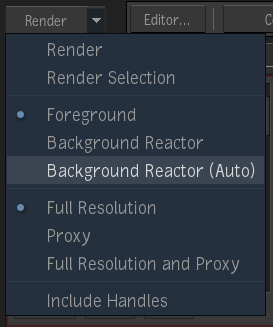
With Background Reactor (Auto) selected, the text of the Render box changes from white to blue.

|
Automatically sends rendering jobs to Background Reactor.
Click Reactor to send the whole sequence to background rendering. |

|
Automatically sends rendering jobs to Background Reactor.
Click Reactor Sel to send only the selected segments to background rendering. |
With Background Reactor (Auto) on, a segment starts rendering in the background when:
- You scrub the playhead away.
- You unselect it.
Burn
Burn allows you to render images in the background using low-cost Linux workstations and frees your workstation for more creative tasks. With Burn, facilities can leverage a larger pool of rendering power so that complex visual effects requiring intensive processing can be created more quickly. See the Rendering on Networked Hardware section of the Installation and Configuration Guide for more information of how to install, license, and configure Burn to work with Flame.
About Automatically Disabled HWAA
In order to increase performances when in interactive mode, the hardware anti-aliasing (HWAA) level in interactive mode gets automatically disabled whenever the graphics card doesn't have enough memory. This can happen in Text, GMask, and Action modules.
Whenever the graphics card has to swap some of the textures to disk in order to allocate memory for a large HWAA buffer, the responsiveness of the system is affected. To increase the reactivity of the interactive mode, Flame disables the HWAA whenever this happens. The availability of HWAA in interactive mode depends two factors: the amount of graphics memory available when the HWAA level is set, and on the resolution of the monitor where the user interface is displayed.
Static Frame Pipeline Optimization
Rendering media can be time-consuming, and depends on a number of factors, including the type of media and the effects applied to it. Static frame pipeline optimization can significantly decrease rendering times for sequences or Batch or Batch FX schematics that use static source generators (such as the Coloured Frame Node, for example), static media (stills), and static effects. A static effect is one that is not animated over time, such as static Text or a static GMask. When rendering static media, the result of a static source generator or a static effect, Flame renders and caches a single static frame, and uses that frame for the duration of the static element, rather than rendering each individual frame. This enables noticeably shorter rendering times.