Inline and Non-Inline Textures
Inline and non-inline saving preferences are for material assets, and changed the visual warning for missing non-inline textures.
Missing Non-Inline Textures
The dummy texture for missing non-inline textures is pink and black checkerboard.
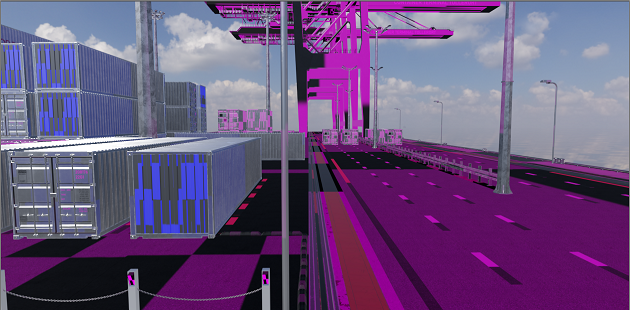 |
|---|
| Dummy texture for missing non-inline textures |
For transparent textures with Use Cutout Transparency enabled, the dummy texture will be checkered and transparent.
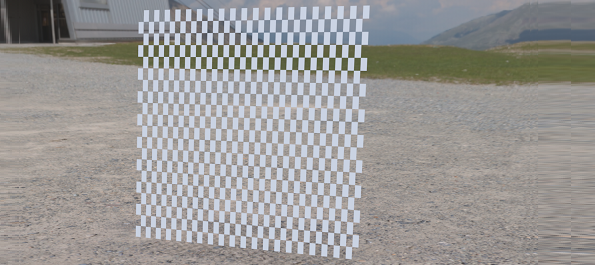 |
|---|
| Transparent textures with Use Cutout Transparency enabled |
Fixing Missing Non-Inlined Textures
If you see a pink and black checkerboard texture in a scene, this indicates there is one or more missing non-inlined textures. Check the Terminal log for a yellow warning messages, similar to this:
D:/Documents/Project1/Lightmap_GeoWall.exr not found! Replacing with pink dummy texture.In this case, use the file name to help determine the kind of texture and geometry associated with the issue. From the example file name above, we can determine a lightmap file could not be found (Lightmap_...exr), and it is likely on geometry called GeoWall. Beyond this, there is currently no additional information as to where the image is used in the scene.
If you knows where the missing file is located on disk, load the file, using the Bake Light and Shadows module > Advanced tab > Lightmap section > Texture controls. If many of the lightmap files are now in a different folder, try repathing these lightmaps all at once (if the new ones are all in the same folder), by selecting the geometries with the missing lightmaps, then in the Bake Light and Shadows module, select File menu > Repath Lightmaps.
Non-Inlined Textures for Lightmaps
For saving textures non-inlined for specific lightmaps, bake the lightmaps with Save Texture as External Reference activated. Those lightmaps will be saved non-inlined in the vpb, even if the Preference option, Use Inline Textures, is enabled.
Texture Saving Preferences for Material Assets
We added two options to the Asset Manager preferences for setting how material textures are saved in a material asset.
Inline Textures - Embeds the texture data in the asset osb file. This is the default behavior and the same as in previous VRED versions.
External Image Files - Copies the original image files referenced in the material to an
imagessub-folder in the material asset folder and freeing up memory, instead of embedding the texture data into the asset obs. These files are referenced, via a relative path.Here are some important things to note:
Each material asset has its own
imagessub folder, so there is no sharing of the same textures across assets.Image files in the material asset folder cannot be renamed, but their content can be changed.
If texture files have the same file name, the file name is made unique by appending the name with a number.
After a material asset has been saved, the material textures in the VRED scene reference the image files in the asset folder.
The
imagesfolder is always re-created when re-saving the same asset. For example, when modifying a material asset inside VRED and loading different textures with different names, the previous textures are deleted from theimagesfolder.Texture files that are the same (same name, same data) are stored only once in that folder.
If an original image file no longer exists or cannot be accessed, the data is inlined.
If a material asset with non-inlined (extermal) textures is loaded, and a texture file path cannot be found, a pink and black checkerboard texture appears, indicating a missing non-inlined texture.
The Use Inline Textures option from Preferences > FileIO > OSB/VPB has no influence on saving material assets.