Learn about the Get/Checkout Dialog in the AutoCAD Vault add-in.
The Get/Checkout dialog has two settings: collapsed (<<) and expanded (>>). The collapsed view provides an express workflow for checking files and folders out of a vault. The expanded view provides more information about the files available for checkout. Additional settings are also available in this view, such as working folder preferences or released bias enforcement.
 .
.
Features of the Get/Checkout Dialog
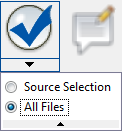
- Source Selection–Selects only the files that were initially highlighted in the main client view when you launched the Get/Checkout dialog.
- All Files–Selects all files listed in the Get/Checkout dialog, including any child or parent files, or linked objects you've included.
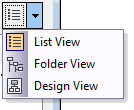
- List View
 View the contents of the Get pane in a flat list.
- Folder View
 View the contents of the Get pane in a tree structure.
- Design View
 View the contents of the Get pane as they relate to a design.
|
Feature |
Details |
|---|---|
|
Thumbnail View
|
If only one file is selected, a thumbnail of the file is displayed. If more than one file is selected, a generic thumbnail with multiple documents is displayed. |
|
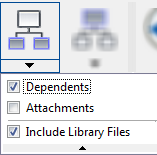
Include Children
|
Toggles between including specified children files for checkout or ignoring children files. Click the Include Children button to add the specified children file types to the current list of files.
Tip: Hover your mouse over the Include Children button at any time to see the current inclusion settings.
Click the drop-down arrow beneath the Include Children Button to change which children types are included when the Include Children feature is on. Turn off the Include Children feature by clicking it again. All include settings are ignored. |
|
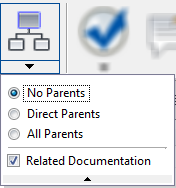
Include Parents
|
Toggles between including specified parent files or related documents for checkout or ignoring parent files and related documents. Click the Include Parents button to add the specified parent file types or related documents the current list of files.
Tip: Hover your mouse over the Include Parents Button at any time to see the current settings.
Click the drop-down arrow beneath the Include Parents Button to change which parent types, if any, are included when the Include Parents feature is on. Turn off the Include Parents button by clicking it again. All include settings are ignored. |
|
Check
|
Automatically selects all objects listed in the Get/Checkout dialog or only the original objects selected before you launched the Get/Checkout dialog. This is a useful feature if you have enabled the Include Children, Include Parents, or Include Links buttons and want a fast way to select related objects for checkout. Tip: Hover your mouse over the icon at any time to see the current settings.
Click the drop-down arrow beneath the Check button to change your selection settings.
|
|
Comments
|
Add a description or document the purpose for checking out the selected files. Tip: Hover your mouse over the Comments button to see any comments already recorded.
|
|
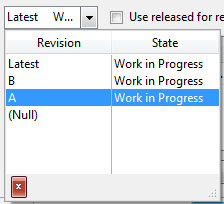
Select Revision
Note: The Revision feature is available in Autodesk Vault Professional.
|
Displays all revisions available for the file. Select the revision that you want to check out from the drop-down menu. The latest version of the leading revision is automatically selected if you choose Latest from the drop-down menu, or if multiple files are selected for check out.
Note: See
Revisions for more information.
|
|
Use released for related files check box
|
Gets the released versions of any related files selected for check out. |
|
View Settings
|
Controls how files in the vault are displayed. |
|
Grid Controls
|
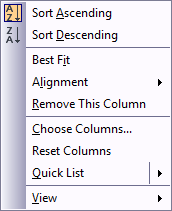
Right-click on the Get view pane to customize how files are displayed, including which columns are included, how files are aligned, and how files are sorted. Refer to Custom Grid Options for more information. |
|
Selected for Check Out Column
|
Shows the files currently selected for checkout. Any selected files are downloaded to the local working folder as read-write files and can be modified. Unselected files are downloaded as read-only to the local working folder and cannot be modified. This is called a Get File event. |
|
Object Selection Counters
|
Shows the number of files selected for checkout
For example, in this image there are 4 files selected for checkout and 11 additional files listed for download. |
|
Pin Dialog in Expanded Mode
|
When the dialog is expanded, it does not retain that mode when next opened. Click the Pin button
|
|
Expand to Show Details
|
Click the expand button to toggle between collapsed and expanded view of the Get/Checkout dialog. |
|
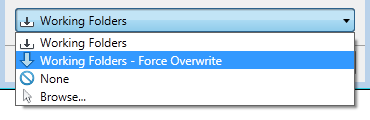
Working Folders Drop-Down Menu
|
Specify whether you want to use the default working folder or select another folder to store the local copies of the objects that you download. You can also select no working folder.
Note: See
Working Folders for more information.
|





 and the number of files that will be downloaded but not checked out
 .
.
 the dialog in the expanded mode each time it is opened.