WatSed is no longer supported starting InfoWorks WS Pro version 2021.8, but existing WatSed runs that were made in earlier versions of the application are still available for results review.
WatSed Simulations
Introduction
InfoWorks WS incorporates a version of the WatSed pipe sedimentation model. WatSed was originally developed by the Water Research Centre to work with their WatNet software package.
- The WatSed model is a basic erosion and deposition model
- You can only model one type of sediment at a time
- The underlying calculations are based on the well established Ackers-White theory for sedimentation modelling
- the extensive reporting options in InfoWorks allow you to make full use of the model
You cannot specify the initial state of sedimentation in the network. This means that the model can only be used to indicate areas where sedimentation problems are likely to occur. You cannot really use it to predict sedimentation at a particular time during a simulation.
Scheduling a WatSed simulation
You schedule a WatSed simulation in much the same way as any other InfoWorks WS simulation. To set up the specific WatSed parameters:
- Select WatSed from the Run Type dropdown list. This should activate the Options button.
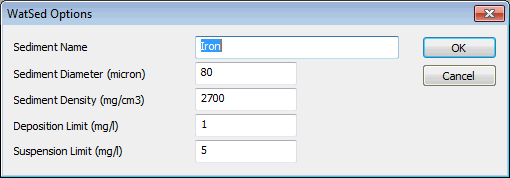
- Click the Options button to display the WatSed Options dialog.
- Give the pollutant a name, and enter values for the four parameters. These are described more fully in the WatSed Options dialog topic.
See Creating and Scheduling a Run for full details on the rest of the process.
Viewing the Results
There are three additional results fields for a WatSed simulation. You can view these results using any of the standard methods described in the Results section. InfoWorks provides some built in themes for use with the additional results fields.
Additional Result Fields
There are three additional results fields for all the pipes in the network. they are:
- Pipe Carrying Capacity - Concentration of sediment that can be held within flow at the current timestep
- Sediment Status - whether erosion or deposition are occurring at the current timestep
- Cumulative Sediment Status - the state the link was in during the simulation, if it remained in the same state throughout. Otherwise, the cumulative status is Variable.
Using Themes
You can display information about Sediment Status (timestep or cumulative) on the GeoPlan Window using built-in link themes.
The most useful theme displays Sediment Status by colouring links in different colours depending on status. You can then see the status change during the simulation.
The field to display for the Sediment Status theme is sim.sedstat.
You can also apply a fixed theme showing Cumulative Sediment Status using the sim.cumsedst field.
Apply these themes on the Link Theme Page (see GeoPlan Properties - Theme Tabs). Display the Properties dialog by right clicking the GeoPlan Window and choosing Properties from the context menu.
For more about applying themes to the GeoPlan Window, see Displaying Themes.
WatSed Options dialog
Use the WatSed Options dialog to set the additional options used for a WatSed Simulation.
The dialog is displayed when you select WatSed as the Run Type, and then click the Options button on the Schedule Hydraulic Run View.
The dialog will always display the default options for Iron deposits in the pipe. You can change any of the parameters you want. The required parameters are:
| Parameter | Description |
|---|---|
|
Sediment Name |
Descriptive name for the sediment - maximum 30 characters |
|
Sediment Diameter (microns) |
The diameter of particles representative of those likely to cause noticeable water quality deterioration Default = 80. Minimum = 45. Maximum = 200. |
|
Sediment Density (mg / cm3) |
The density of the particles Default = 2700. Minimum = 2000. Maximum = 4000. |
|
Deposition Limit (mg / l) |
If the calculated carrying capacity of the pipe is less than the deposition limit then sediment is being deposited in the pipe Default = 1. Minimum = 0. Maximum = 20. Subject to the restriction that Suspension Limit > Deposition Limit. |
|
Suspension Limit (mg / l) |
If the calculated carrying capacity of the pipe is greater than the suspension limit then sediment is eroded from the pipe bed and remains in suspension Default = 5. Minimum = 0. Maximum = 20. Subject to the restriction that Suspension Limit > Deposition Limit. |