新しく開発された API を解析モデリングのコンテキストで説明します。
- 解析用モデリングの自由度を持ち、システム全体として見られる構造要素や建物/構造に対して、個々の設計上の決定を反映することができます。
- あらゆるタイプの構造を解析的に表します。
- Revit モデルから構造解析ジョブを実行できる、一貫した解析モデルを作成します。
- 解析ソフトウェアを使用して完全な双方向ワークフローを実行し、そこで行われたモデルの変更をキャプチャします。
- 必要に応じて、予期しない変更から解析用モデルを保護します。
- さまざまな解析タイプと設定を反映した複数の解析用モデルを作成します。
- 専用の構造解析ソフトウェアと同様に、パラメータとコラボレーション機能を組み合わせて BIM プラットフォームを実現する解析用モデリングを簡単に行うことができます。
新しい API を使用した Revit 要素
新しい API クラス
AnalyticalElement -すべての解析オブジェクトの基本クラスを表します。AnaltyicalModel の代替です。
-
Transform GetTransform () - Returns the transform which reflects Analytical Element orientation.
-
AnalyzeAs AnalyzeAs - This represents the Analyze As parameter assigned to Analytical Element.
-
Reference GetReference (AnalyticalModelSelector selector) - Returns a reference to a given curve within the Analytical Element.
-
ElementId MaterialId - Defines the Material Id for the Analytical Element.
AnalyticalMember - 構造解析モデルの直線要素を表します。AnalyticalModelStick と AnalyticalModelColumn の代替です。
-
AnalyticalMember Create(Document aDoc,Curve curve) - Method which creates a new instance of an Analytical Member within the project.
-
AnalyticalStructuralRole StructuralRole - The structural role assigned to the Analytical Member.
-
Curve GetCurve () - Returns the curve of the Analytical Member.
-
void SetCurve(Curve curve) - Sets the curve for the Analytical Member. This method disconnects elements from other analytical elements (if the end nodes are in the same position).
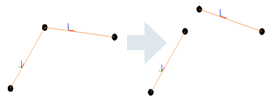
·If the user wants to move the corner, and keep the connection, there are other ways for achieving that such as ElementTransformUtils.moveElements.
-
bool IsValidCurve(Curve curve) - Verifies if the curve is valid for an Analytical Member.
-
void FlipCurve() - Flips the ends of the Analytical Member.
-
StructuralSectionShape StructuralSectionShape - The structural section shape of the Analytical Member (read only).
-
ElementId SectionType - The id of the type from the structural family assigned to the Analytical Member.
-
double CrossSectionRotation - Cross-section rotation of the Analytical Member.
-
AnalyticalPanel Create(Document aDoc, CurveLoop curveLoop) - Method which creates a new instance of an Analytical Panel within the project.
-
CurveLoop GetOuterContour() - Returns the Curve Loop that defines the geometry of the Analytical Surface element.
-
bool IsCurveLoopValid(CurveLoop profile) - Checks if curve loop is valid for Analytical Panel.
- 解析用パネル ジオメトリを修正するには、SketchEditScope フレームワークを使用する必要があります。これは新しいメソッドで強化されています。
-
void StartWithNewSketch(ElementId elementId) - Starts a sketch edit mode for an element which, at this moment, doesn't have a sketch.
-
- ジオメトリを編集する別の方法は次のとおりです。
-
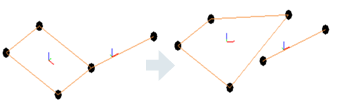
void SetOuterContour(CurveLoop outerContour) - Sets the Curve Loop that defines the geometry of the Analytical Surface element.
-
AnalyticalMember の場合と同様に、解析用パネルの等高線を設定すると、他の解析要素との接続が切断されます。コーナーの移動時に接続を維持する場合は、ElementTransformUtils.moveElements などの他の方法を使用します。
-
- 解析用パネル ジオメトリを修正するには、SketchEditScope フレームワークを使用する必要があります。これは新しいメソッドで強化されています。
-
ISet<ElementId> GetAnalyticalOpeningsIds() - Returns the Analytical Openings Ids of the Analytical Panel.
-
ElementId SketchId - Sketch associated to this Revit element.
-
AnalyticalStructuralRole StructuralRole - Structural role assigned to the Analytical Panel.
-
AnalyticalOpening Create(Document doc, CurveLoop curveLoop, ElementId panelId) - Method which creates a new instance of an Analytical Opening within the project.
-
CurveLoop GetOuterContour () - Returns the Curve Loop that defines the geometry of the Analytical Surface element.
-
bool IsCurveLoopValidForAnalyticalOpening(CurveLoop loop, Document aDoc, ElementId panelId) - Checks if curve loop is valid for Analytical Opening.
- 解析用開口部ジオメトリを修正するには、SketchEditScope フレームワークを使用します。
- 解析用開口部ジオメトリを修正する別の方法は次のとおりです。
-
void SetOuterContour(CurveLoop outerContour) - Sets the Curve Loop that defines the geometry of the Analytical Surface element.
-
-
ElementId PanelId - ElementId of the host Analytical Panel.
-
ElementId SketchId - Sketch associated to this Revit element.
AnalyticalToPhysicalAssociationManager - 解析要素と物理要素の関連付けを管理します。以前は、要素自体が互いを認識しており、ユーザーは要素をコントロールすることができませんでした(関連付けを変更できませんでした)。この新しい方法を使用すると、関連付けを編集できます。1 対 1 の関連付けがサポートされており、要素を同時に複数の関連付けの一部にすることはできません。
-
 AnalyticalToPhysicalAssociationManager GetAnalyticalToPhysicalAssociationManager(Document doc) Returns the AnalyticalToPhysicalAssociationManager for this
document.
-
void AddAssociation(ElementId analyticalElementId, ElementId physicalElementId) - Adds a new association between an analytical element and a physical element.
-
void RemoveAssociation(ElementId elementId) - This method will remove the association for the element with the given ElementId.
-
ElementId GetAssociatedElementId (ElementId elementId) - Returns id of the element which is associated with the given ElementId.
-
bool HasAssociation(ElementId id) - Verifies if the element has already defined an association.
-
AnalyticalNodeData GetAnalyticalNodeData ( Element element) - Returns AnalyticalNodeData associated with this element, if it exists.
-
AnalyticalNodeConnectionStatus GetConnectionStatus () - Returns the Connections Status for an
Analytical Node.
AnalyticalLinks、BoundaryConditions、Loads が移行され、新しい要素で動作するようになりました。これらに関連する API は、ほとんどの場合は同じままです。荷重に対する機能が強化されました。
-
LineLoad.Create(Document aDoc,ElementId hostElemId, XYZ forceVector1, XYZmomentVector1, LineLoadType symbol).
-
LineLoad.Create(Document aDoc,ElementId hostElemId, int curveIndex, XYZ forceVector1, XYZ momentVector1, Structure.LineLoadType symbol).
-
LineLoad.IsValidHostId(Document doc, ElementId hostElemId).
-
AreaLoad.IsValidHostId(Document doc, ElementId hostElemId).
-
AreaLoad.Create(Document doc, ElementId hostElemId, XYZ forceVector1, AreaLoadType symbol).
-
 PointLoad.Create(Document doc, ElementId hostElemId, AnalyticalElementSelector selector, XYZ forceVector, XYZ momentVector, AreaLoadTyp
symbol).
-
PointLoad.IsValidHostId(Document doc, ElementId hostElemId).
サンプル
AnalyticalMember の作成
      using (Transaction transaction = new Transaction(document, "Create Analytical Member"))
               {
                  transaction.Start();
                  //create curve which will be assigned to the analytical member
                  Line line = Line.CreateBound(new XYZ(0, 0, 0), new XYZ(5, 0, 0));
                  //create the AnalyticalMember
                  AnalyticalMember analyticalMember = AnalyticalMember.Create(document, line);
                  analyticalMember.StructuralRole = AnalyticalStructuralRole.StructuralRoleBeam;
                  transaction.Commit();
                }
解析用パネルの作成
 using (Transaction transaction = new Transaction(revitDoc, "Create Analytical Panel"))
         {
            transaction.Start();
            //create the curveLoop for the AnalyticalPanel element
            CurveLoop profileloop = new CurveLoop();
            profileloop.Append(Line.CreateBound(new XYZ(1, 1, 0), new XYZ(2, 1, 0)));
            profileloop.Append(Line.CreateBound(new XYZ(2, 1, 0), new XYZ(2, 2, 0)));
            profileloop.Append(Line.CreateBound(new XYZ(2, 2, 0), new XYZ(1, 2, 0)));
            profileloop.Append(Line.CreateBound(new XYZ(1, 2, 0), new XYZ(1, 1, 0)));
            //create the AnalyticalPanel
            analyticalPanel = AnalyticalPanel .Create(revitDoc, profileloop);
            transaction.Commit();
          }
物理要素と解析要素の間に新しい関連付けを追加する
using (Transaction trans = new Transaction(doc, "AddAssociationBetweenPhysicalAndAnalyticalElements"))
 {
            trans.Start();
            ElementId analyticalElementId = ContextualAnalyticalModel.Utilities.GetSelectedObject(activeDoc, "Please select analytical element");
            ElementId physicalElementId = ContextualAnalyticalModel.Utilities.GetSelectedObject(activeDoc, "Please select physical element");
            //gets the AnalyticalToPhysicalAssociationManager for the current document
            AnalyticalToPhysicalAssociationManager analyticalToPhysicalManager = AnalyticalToPhysicalAssociationManager.GetAnalyticalToPhysicalAssociationManager(doc);
            if (analyticalToPhysicalManager == null)
               return Result.Failed;
            //creates a new association between physical and analytical elements
            analyticalToPhysicalManager.AddAssociation(analyticalElementId, physicalElementId);
            trans.Commit();
  }
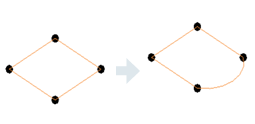
SketchEditScope フレームワークを使用して解析用パネルの境界を編集する
             // Start a sketch edit scope
             SketchEditScope sketchEditScope = new SketchEditScope(document, "Replace line with an arc");
               sketchEditScope.StartWithNewSketch(analyticalPanel.Id);
               using (Transaction transaction = new Transaction(document, "Modify sketch"))
               {
                  transaction.Start();
                  //replace a boundary line with an arc
                  Line line = null;
                  Sketch sketch = document.GetElement(analyticalPanel.SketchId) as Sketch;
                  if (sketch != null)
                  {
                     //find first line in the sketch profile
                    …..
                  }
  	              // Create arc
                  XYZ normal = line.Direction.CrossProduct(XYZ.BasisZ).Normalize().Negate();
                  XYZ middle = line.GetEndPoint(0).Add(line.Direction.Multiply(line.Length / 2));
                  Curve arc = Arc.Create(line.GetEndPoint(0), line.GetEndPoint(1), middle.Add(normal.Multiply(20)));
                  // Remove element referenced by the found line.
                  document.Delete(line.Reference.ElementId);
                  // Model curve creation automatically puts the curve into the sketch, if sketch edit scope is running.
                  document.Create.NewModelCurve(arc, sketch.SketchPlane);
                  transaction.Commit();
               }
               sketchEditScope.Commit(new FailurePreproccessor());
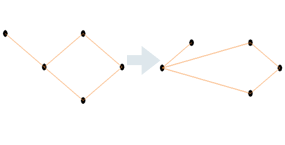
解析用ノードを移動して接続を維持する
            // Create Analytical Panel
            AnalyticalPanel analyticalPanel = CreateAnalyticalPanel.CreateAMPanel(document);
            // Create the connected Analytical Member
            AnalyticalMember analyticalMember = CreateAnalyticalMember.CreateMember(document);
            // Select the node
            Reference eRef = activeDoc.Selection.PickObject(ObjectType.PointOnElement , "Select an Analytical Node");

            // Move the Analytical Node using ElementTransformUtils
            using (Transaction transaction = new Transaction(document, "Move node with ElementTransformUtils"))
            {
               transaction.Start();
               ElementTransformUtils.MoveElement(document, eRef.ElementId, new XYZ(-5, -5, 0));
               transaction.Commit();
            }
解析用サーフェスの等高線の点を取得する
      private List<XYZ> GetSurfaceContourPoints( Document doc, ElementId elementId )
      {
         	// Create point list, get list of curves from analytical model
         	List<XYZ> contourPoints = new List<XYZ>();
         	AnalyticalModel analyticalModel = (doc.GetElement(elementId) as AnalyticalModel);
         	IList<Curve> curves = analyticalModel.GetCurves(AnalyticalCurveType.RawCurves);

         	// Iterate over curves and make the desired processing
         …...
        	return contourPoints;
      }
      private List<XYZ> GetSurfaceContourPoints( Document doc, ElementId elementId )
      {
         	// Create point list, get list of curves from analytical model
         	List<XYZ> contourPoints = new List<XYZ>();
         	AnalyticalPanel analyticalPanel = (doc.GetElement(elementId) as AnalyticalPanel);
          CurveLoop outerContour = analyticalPanel.GetOuterContour();

         	// Iterate over curves and make the desired processing
          …...
        	return contourPoints;
      }
物理要素に関連付けられている解析要素を取得する
      AnalyticalElement GetAnalyticalElement(Element physicalElement)
      {
         AnalyticalElement analyticalElement = null;
         Document document = element.Document;
         AnalyticalToPhysicalAssociationManager assocManager = AnalyticalToPhysicalAssociationManager.GetAnalyticalToPhysicalAssociationManager(document);
         if (assocManager != null)
         {
            ElementId associatedElementId = assocManager.GetAssociatedElementId(physicalElement.Id);
            if (associatedElementId != ElementId.InvalidElementId)
            {
               Element associatedElement = document.GetElement(associatedElementId);
               if (associatedElement != null && associatedElement is AnalyticalElement)
               {
                  analyticalElement = associatedElement as AnalyticalElement;
               }
            }
         }
         return analyticalElement;
      }
ライン境界条件を作成する
以前の解決策の場合:
        private BoundaryConditions CreateLineBC(Element hostElement)
        {
										    Document createDoc = hostElement.Document.Create;

             	// use Document.NewLineBoundaryConditions Method
              BoundaryConditions createdBC =
                    createDoc.NewLineBoundaryConditions(hostElement.GetAnalyticalModel(), 0, 0, 0, 0, 0, 0, 0, 0);

            return createdBC;
        }
新しい解決策の場合:
      private BoundaryConditions CreateLineBC(Element hostElement)
      {
         Document createDoc = hostElement.Document.Create;

         // use Document.NewLineBoundaryConditions Method
         AnalyticalElement analyticalElement = GetAnalyticalElement(hostElement);
         BoundaryConditions createdBC =
                    createDoc.NewLineBoundaryConditions(analyticalElement, 0, 0, 0, 0, 0, 0, 0, 0);
         return createdBC;
      }