Parameter Relationships
Parameters can be affected by each other.
There are relationships between Parameters where the value of one Parameter can affect:
- whether another Parameter can be set, or is read-only
- what parameters are valid for the element
- the computed value of another parameter
Additionally, some parameters are always read-only.
Some parameters are computed in Revit, such as wall Length and Area parameter. These parameters are always read-only because they depend on the element's internal state.
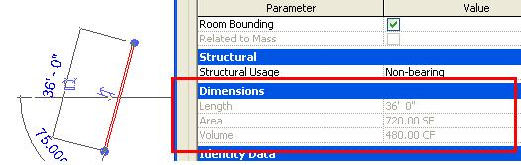 Figure 29: Wall computed parameters
In this code sample, the Sill Height parameter for an opening is adjusted, which results in the Head Height parameter being re-computed:
| Code Region: Parameter relationship example |
|
Global parameters also have relationships with other parameters. See the GlobalParameter Basics topic for more information.