Retopology Tools Interface
Retopology Tools for 3ds Max uses the following interface.
Retopology tools rollout
Algorithm options menu
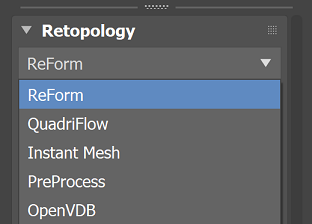
Use the primary Retopology dropdown to set the retopology algorithm to use: either ReForm, QuadriFlow, Instant Mesh, Preprocess (standalone) or OpenVDB (standalone).
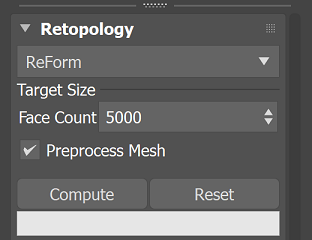
Target Size:
- Face Count: Sets target for the total number of quad polygons the retopology algorithms will use to attempt to reconstruct the mesh.
If more polygons are required than the specified number, the algorithms will utilize a higher value to retopologize. - Note: This parameter is available for all the Remesh options other than OpenVDB (which has Voxel Size instead).
- Face Count: Sets target for the total number of quad polygons the retopology algorithms will use to attempt to reconstruct the mesh.
Preprocess Mesh: Remeshes your model as a pre-processing step before computing the retopology operation. Tip: you can also utilize the ReForm Pre-Process model to generate a proxy remesh object that will be utilized as the data set for the Retopology algorithms to work with.
- Note: This parameter is only available for non-standalone options: ReForm, QuadriFlow and Instant Mesh.
Compute Button: Generates a retopologized mesh based on the current parameters. Use this button to run the algorithm.
Reset Button: Resets the mesh to match the state of the data coming into the modifier. Use this button to reset your changes.
Use the progress bar to monitor the speed of your retopologize operation.
ReForm Settings
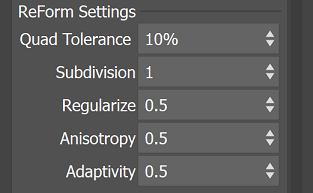
ReForm is a state-of-the-art quad topology global optimization technology developed by Autodesk to outperform direct and wave propagation methods significantly, guaranteeing gap and crack-free results, lower distortion, and smoother maps without shrinkage or volume loss.
- Quad Tolerance: Sets the highest acceptable margin of error from the Face Count vs. the actual retopologized mesh. Note that lower values will increase computation time.
- Subdivision: Specifies The ratio of surface points skipped vs those sampled by retopologization. Skipping many points (ie. choosing a ratio greater than 1) can decrease calculation time but will greatly diminish the level of detail.
- For example, when this value is set to 1, no subdivision occurs. When this value is set to 2, ReForm will process a quarter of the target quad face count and then subdivide the surfaces to generate a result. When this value is set to 3, a ninth of the target quad face will be generated, which will then be subdivided at two levels to give the target output result.
- Regularize: Controls the overall face uniformity of the retopologized mesh. Higher values will result in fewer singularities (vertices without 4 connected edges) at the expense of smoothing over fine details.
- For example, When this value is set to 1, ReForm will generate quad polygons of roughly equal size. When the value is set to 0, ReForm will vary the size of the quad polygons that it generates to better match the topology it is trying to remesh. The default is set to 0.5.
- Anisotropy: Controls adaptivity to the curvature of the original surface. Lower values cause faces to stretch less and “square up” at the expense of rounding out tight curves.
- For example, when this value is set to 0, ReForm will attempt to generate very square-shaped quads, which is useful for hard surface meshes. When this value is set to 1, ReForm will allow more rectangular-shaped quads, which can better adapt to complicated shapes. Note: A higher value can be too high for certain cases and the quad edge length ratios can become extreme, which may be undesirable for some applications.
- Adaptivity: Controls the size and shape of the retopologized faces. Lower values result in more uniformly sized faces at the expense of rounding out tight curves.
Preprocess (standalone) Settings
AMT Preprocessing, that is currently used in ReForm, is available from the algorithm dropdown as a standalone remeshing option (available for 3ds Max 2022 or newer). When you use this function, it will only perform the AMT Preprocess step, giving you a triangulated output result.
The interface for this option is very similar to the options for ReForm, with the main difference being the absence of the ReForm Settings option.
Auto Edge Settings
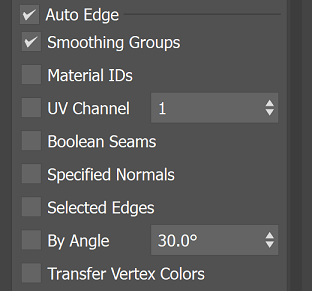
- Auto Edge: Auto edge, if enabled, lets you utilize various types of mesh data that already exist on your mesh through the modeling process as a constraint to influence the output form that ReForm generates. You can use Auto Edge to retain hard surface details on your mesh, but the option can also be useful for specifying an important form that you want to retain as well. With Auto Edge, mesh data that you are processing through ReForm such as UVs, Normals, and so forth, will be maintained on the output mesh for Retopology.
- Smoothing Groups: Uses the edges defined by smoothing groups and hard edges on your mesh as a constraint.
- Material IDs: Uses the boundary edges of each Material ID channels as a constraint.
- UV Channel: Uses the borders of UV islands as a constraint.
- Boolean Seams: Uses the Boolean Seams, edges created by the interaction of geometric objects, that are stored in your mesh after a Boolean operation as a constraint.
- Specified Normals: Enables the use of hard edges based on discontinuities in specified vertex normals between adjacent faces as a constraint.
- Selected Edges: Enables the use of selected edges passed up the modifier stack as a constraint.
- By Angle: Enables the use of hard edges based upon the specified angle tolerance between adjacent face normals as a constraint.
- Transfer Vertex Colors: Enables the use of vertex color data as a constraint as the algorithm will transfer data to the output mesh.
QuadriFlow Settings
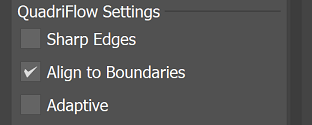
QuadriFlow is an open-source scalable algorithm for generating quadrilateral surface meshes based on the Instant Field-Aligned Meshes of Jakob et al. (ACM Trans. Graph. 34(6):189, 2015) and was developed by Jingwei Huang, Yichao Zhou, Matthias Niessner, Jonathan Shewchuk and Leonidas Guibas. QuadriFlow: A Scalable and Robust Method for Quadrangulation, The Eurographics Symposium on Geometry Processing (SGP) 2018.
- Sharp Edges: Enables the QuadriFlow algorithm for hard-edge detection. This will allow the algorithm to better retain hard edges from the input mesh topology.
- Align to Boundaries: When enabled, attempts to preserve the boundary geometry of the input mesh.
- Adaptive: When enabled, uses a non-uniform local spatial step to improve geometric fidelity for the target face count.
Instant Mesh Settings
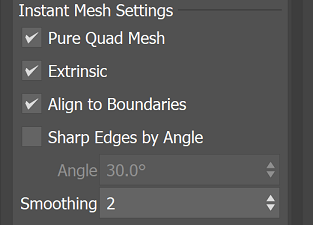
Instant Mesh ian open-source scalable algorithm for generating quadrilateral surface meshes based on the Instant Field-Aligned Meshes of Jakob et al. (ACM Trans. Graph. 34(6):189, 2015). If Instant Mesh is not capturing all your detail, the quad size may be smaller than supported so the details have been ignored.
- Pure Quad Mesh: When enabled, generates a mesh consisting purely of quads rather than a quad-dominant mesh.
- Extrinsic: When enabled, applies extrinsic smoothness metrics. When disabled, intrinsic smoothness metrics are applied.
- Align to Boundaries: When enabled, attempts to preserve the boundary geometry of the input mesh.
- Sharp Edges by Angle: When enabled, use the Instant Mesh algorithm for detecting hard edges based on the specified edge angle.
- Smoothing: Sets the number of smoothing iterations to apply to the output mesh.
OpenVDB (standalone) Settings
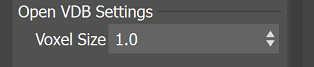
OpenVDB remeshing (available for 3ds Max 2024 or newer) is accessible from the algorithm menu options. When this option is chosen, you can remesh your selected data using OpenVDBs Volume-to-Mesh conversion, which reconstructs water tight geometry using Signed Distance Fields (SDF) grids.
- Voxel Size: The voxel resolution used to arrive at the final mesh. Smaller voxels result in a more detailed result at the expense of slower computation time and more RAM usage. Adjust this parameter to change the resolution of your generated output.
ESC key to abort the OpenVDB process. This mechanism will help when you have accidentally set a voxel size to a value that causes long and delayed processing time. Note: For complex OpenVDB calculations this abort might not be instantaneous and have a delay if OpenVDB is consuming a significant amount of CPU and memory resources already.Output Settings Menu
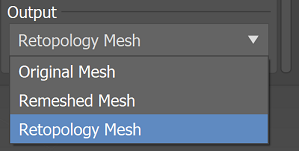
- Output: Selects the mesh to display while adjusting the retopology parameters. You can select between Original Mesh, Remeshed Mesh or Retopology Mesh.
- With the preprocess option from the algorithm dropdown, the Output will be automatically set to Remeshed Mesh (so your mesh will display in the viewport).