Increment and Save
 +
+ 
Provides options for saving your file incrementally, such as automatically saving on exit and setting naming conventions for your saved files. Each time you save a file, the set naming conventions are used to name the file.
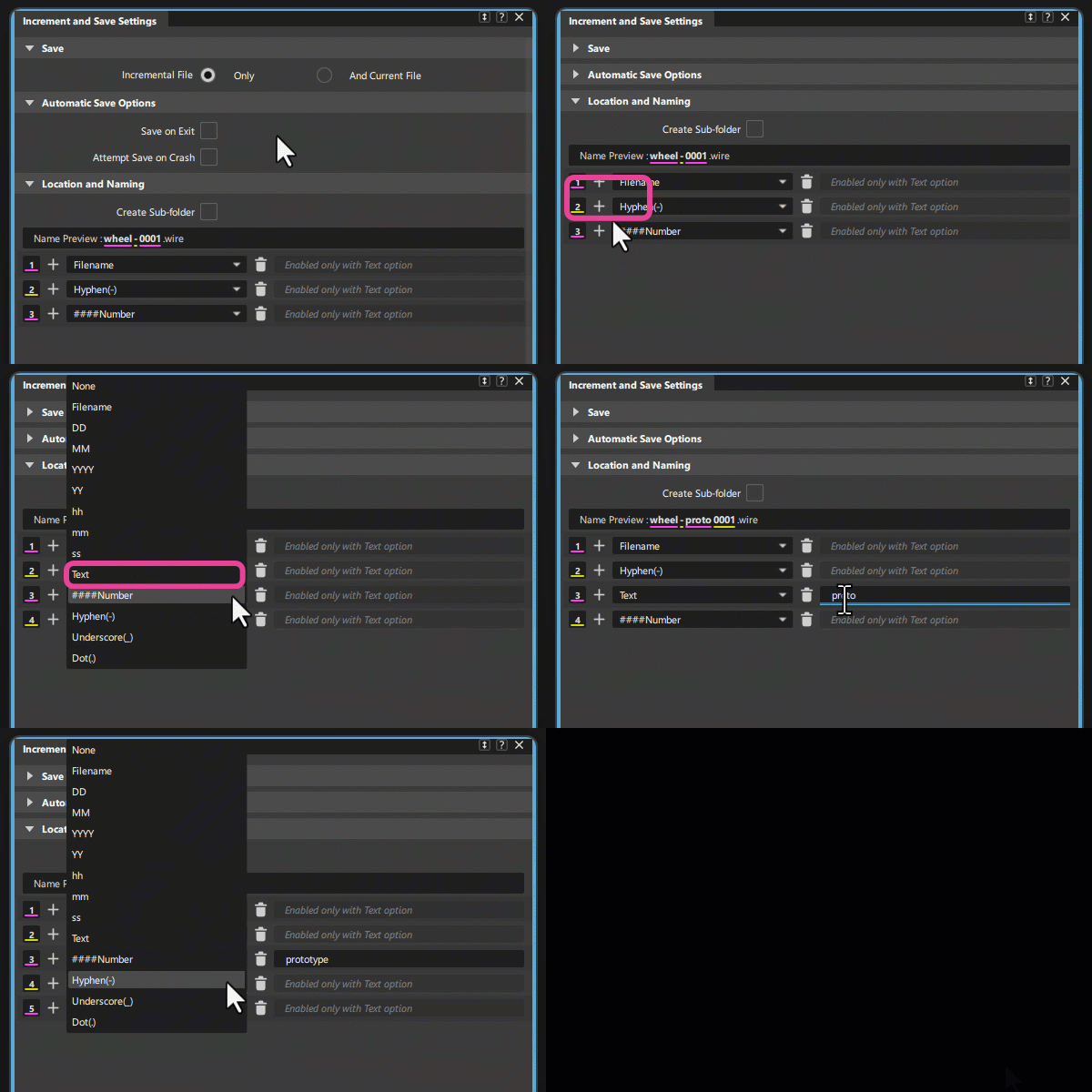
Increment and Save Settings
Save

Increment File Only
Turn on to only save an incremental file according to the set Location and Save Options.
And Current File
Turn on to save your current working file using its original file name as well as an incremental file, according to the set Location and Save Options. This is useful in situations where you want to save incremental files but do not want the name of the file that's currently loaded to change.
Automatic Save Options
Save on Exit
Saves a file when you exit Alias.
Attempt Save on Crash
Saves a file if Alias exits unexpectedly.
Location and Save Options
Create Sub-folder
Creates a sub-folder in your current working directory and saves incremented files to this location.
Name Preview
Displays a preview of the increment file name based on the set naming conventions.
To set the naming conventions:
- Select from the drop-down list to choose predefined text, such as filename, day, or month. To add your custom text, select Text from the list, then type in the space provided.
- To add a new line item, click the
 icon.
icon. - A preview of your set file name displays beside Name Preview.
- To delete a line item, click the
 icon.
icon.