Primitives (subdivision)
Creates primitive subdivision objects, which can use to began shaping your models using the subdivision modeling toolset. Place a primitive by clicking in the scene or by entering a co-ordinate position in the promptline. You can adjust the number of spans in the primitive while the tool is active.
Get started with subdivision modeling in Alias and learn basic terminology and foundations.
Related videos

There are four subdivision primitives:
 Cylinder with 8 radial spans and 1 span in the z axis by default.
 Box with 1 span in the X, Y, and Z axes by default.
 Plane with 2 spans in the X and Y axes by default.
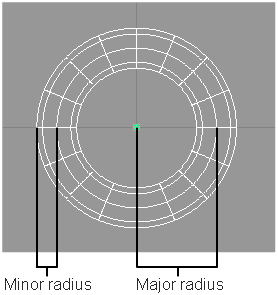
 Torus with 8 spans in the tube section and 8 spans around the tube by default. You can also set the radius of the tube and the distance between the center of the ring and the center of the tube. See Torus primitive settings.
Access these tools from the Subdivision Palette:

Cylinder primitive settings
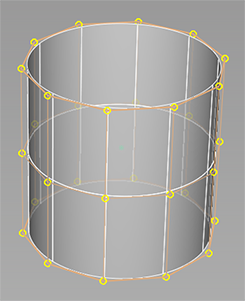
Spans Radial
The number of radial spans for the subdivision cylinder.
Spans Z
The number of spans to create along the z-axis.
Box primitive settings
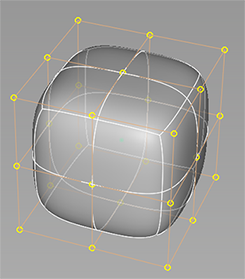
Spans X
The number of spans to create along the x-axis.
Spans Y
The number of spans to create along the y-axis.
Spans Z
The number of spans to create along the z-axis.
Plane primitive settings
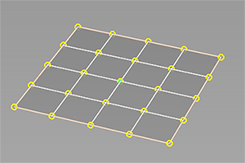
Spans X
The number of spans to create along the x-axis.
Spans Y
The number of spans to create along the y-axis.
Torus primitive settings
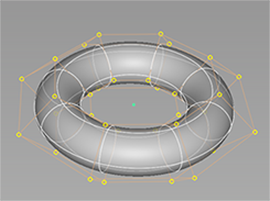
Spans Minor Radius
The number of spans in the tube section.
Spans Major Radius
The number of spans around the tube.
Minor Radius
The radius of the tube.
Major Radius
The distance between the center of the ring and the center of the tube.
About subdivision modeling
What are Alias subdivision objects
Subdivision objects are a type of geometry in Alias that provide smooth continuous surfaces for creating objects and organic shapes. Alias subdivision objects comply with standard Catmull-Clark subdivision surfaces, which makes them like subdivision surfaces in other content creation applications, such as Autodesk® Maya® and Autodesk® 3ds Max®. However, Alias subdivision objects are a collection of continuous NURBS surface patches so they also inherit characteristics from Alias surfaces. This means that Alias subdivision objects include the strengths of Alias NURBS surfaces and traditional subdivision surfaces.
For example, working with continuous subdivision surfaces let you interact with your model in ways that are similar to polygon modeling. This can accelerate the design process by enabling new workflows for fast form-finding and concept modeling. The tight integration with NURBS surfaces lets you enhance concept designs by adding high-quality surfacing details, such as trimming, fillets, and panel gaps to your subdivision objects. The result is a hybrid modeling environment unique to Alias that lets you incorporate both types of geometry into your concept design workflow.