Choosing a Working Color Space
Autodesk Color Management lets you use any color space as your working space, and supports many of the common and standard color spaces. Images are automatically converted from their input color spaces to the working space on import. In addition, some applications let you switch between color spaces for specific operations.
In general, it's best to use a wide-gamut color space for working. This ensures that you can properly represent as many colors as possible. For example, digital cinema (DCI) contains colors that cannot be represented using the Rec. 709 primaries (used by sRGB and HD video) without using negative values. Autodesk Color Management is able to preserve negative values, but other tools may not. In spite of this drawback, the Rec. 709/sRGB primaries are still the most commonly used for scene-linear working spaces.
ACES 2065-1 is an extremely wide-gamut color space that can represent any visible color. It can be used as a working space, but some color operations may give unexpected results because the gamut is so wide.
ACEScg, ACEScc/ACEScct, DCI-P3, ProPhoto-RIMM, or UHDTV (Rec. 2020) are good in-between choices. They have wide gamuts, but they are not too wide.
Some operations work best with colors in a specific type of space: scene-linear, video, or log-encoded. As you work, you may want to switch color spaces to perform certain operations, and then switch back to your main working space or a different space for other operations. For these situations, it's best to use a fully invertible transform to preserve as much color information as possible.
Operations That Work Best with Scene-linear Colors
The following operations work best with scene-linear colors (that is, with code values that are directly proportional to light energy in the scene):
- compositing and blending
- optical effects, including lens blur and defocus operations
- motion blur
- anti-aliasing
- resizing
- sub-pixel repositioning
- 3D rendering
- lighting and re-lighting
Operations That Require Video Colors
The following operations require video colors (that is, color values that are restricted to the range [0, 1]):
- color inversion
- converting RGB to HLS, HSV, or YCbCr
Operations That Work Best with Video or Log Colors
The following operations work best with video or log colors:
- many color correction operations
- vectorscopes and histograms
- tracking and stabilizing
- grain and noise operations
- unsharp masking
- video transitions
- making gradients
Manually Converting Between Working Spaces
Here are some notes that may be useful if you need to convert between working spaces by manually specifying custom chains of transforms from the collection:
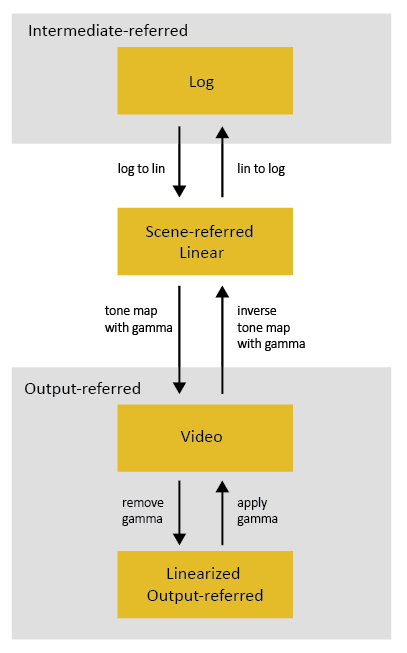
You can convert scene-linear to video by applying a tone map such as PhotoMap_gamma_2.4 in the tone-map/ directory. In general, a tone map uses an S-shaped curve to increase the contrast and compress highlights.
You can convert video to scene-linear by applying an inverse tone map such as inversePhotoMap_gamma_2.4 in the tone-map/ directory. This will not be exact if the footage was originally shot as video or converted with a different tone map, but it can be a good approximation that works well in many cases. In particular, note that simply removing the display gamma from video images produces linearized output-referred values rather than scene-linear values - there are no values above 1.0.
Note: There are special considerations for images that are used as textures and other maps. See Color Managing Textures and Maps.You can convert scene-linear images to log space using one of the Lin_to_Log transforms in the film/LogLin/ directory.
You can convert log images to scene-linear using one of the Log_to_Lin transforms in the film/LogLin/ directory.
You can convert video images to log space by first converting to scene-linear and then to log.
You can convert log images to video space by first converting to scene-linear and then to video.