Previewing a Reveal or Clone Using a Reference Image
Overlaying a reference image on the result offers an intuitive way of previewing paint operations.
When you overlay a source onto the result, you can preview the effects of a Reveal operation. The selected image is superimposed over the result, and the transparency can be adjusted. This allows you to see exactly what your brush strokes will reveal.
To display the reference image:
Enable the Overlay button (Tab).
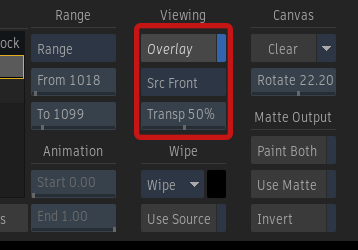
Overlay and Reference buttons, and Transparency field
The reference image appears by default at 50% transparency.
Select the reference image you want to display from the Reference box.
If you selected Source Matte or Source Front, select an image from the Sources list.
With the reference image, you can:
- Ctrl+Shift+drag the source front or source matte to offset it to preview a Reveal operation.
- Scale the image, by entering a value in the Scale field.
- Rotate the image, by entering the angle of rotation in the Rotate field.
- Set the Slip value in the Sources list to show a reference image at a different frame relative to the actual frame position.
- Set the transparency for the reference image in the Transparency field.
Slipping a Reference Image
A reference image that is offset in time can be overlaid on the canvas. You can slip a front, matte, result, output matte, source front, and source matte clips. In the Sources list, use the Slip field to indicate the offset amount.
Each slip value can be set independently. To set the same front and matte values for a source, hold down the Alt key and edit either value.
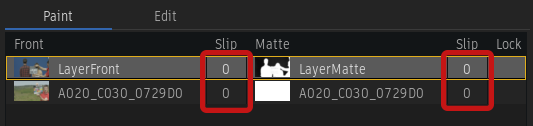
Front and Matte Slip fields