Previewing an Animation
Use the Flipbook command to preview an animation by playing a sequence of either five or nine frames.
To set up the Flipbook command:
Click Setup.
The Setup menu appears.
In the Flipbook area, select an animation mode from the Flipbook box.
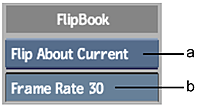
(a) Flipbook box (b) Frame Rate field
Select: To: Flip About Current Play two (or four) frames before the current frame and two (or four) after the current frame. This is the default setting. Flip From Current Play five (or nine) frames beginning at the current frame. Flip To Current Play five (or nine) frames ending at the current frame. Enter the frame rate in the Frame Rate field.
Note: If the system is running at high resolution, it may not be able to achieve a flip rate of 30 frames per second.Press F to play five frames, or press Shift+F to play nine frames.
If you selected Flip About Current, pressing F plays two frames before and after the current frame. Pressing Shift+F plays four frames before and after the current frame.