Wiping an Image
Use the Wipe command to apply colours, filters, and Special Effects media to the entire result image in a single stroke. You can also wipe an image by Wiping the Canvas in AutoPaint.
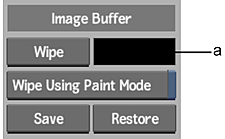
(a) Wipe colour pot
Wiping Using a Colour
Use the Paint medium to wipe the image with a selected colour. The colour used is set in the Wipe colour pot.
- Set the current colour you want to use for the wipe. See Selecting Colours.
- Click the Wipe colour pot. The current colour is transferred to the wipe colour.
- Set the brush opacity. A value of 100% wipes the image with a completely opaque colour.
- Click Wipe.
Wiping Using Special Effects Media and Filters
You can use a filter, or the Reveal, Clone, Wash, and Shade Special Effects media.
Set the wipe colour.
From the Paint Mode controls, select the Special Effects medium to be applied. See Using Special Effects Media.
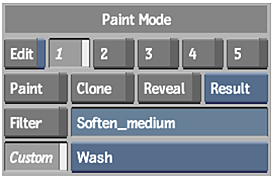 Note: If you are using a filter for the wipe, you must enable the Filter button.
Set the brush opacity. A value of 100% wipes the image with the full effect of the Special Effects Media or filter.
Enable the Wipe Using Paint Mode button.
Click Wipe.
Using the Wipe Command in Graphics
You can also use the Wipe command in the Graphics menu. The Wipe command wipes over any objects tacked down on the image. Objects not tacked down are not part of the image and are not wiped over.