The Settings Page of the Licence Wizard is used as part of the process to set up the Thales licence to be used by users on a client PC.
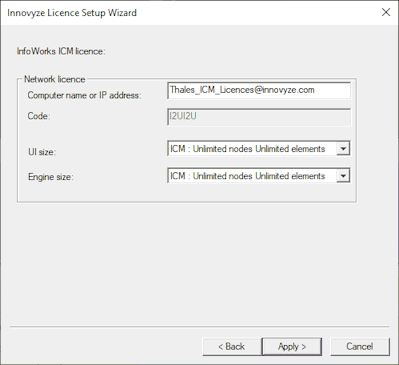
Enter network and licence details:
- Computer name or IP address - The name or IP address of the Thales licence server.
By default, this is set to NO_NET. However, you must specify the name or IP address of the Thales licence server you are using.
- Code - A read-only field that displays the code for the selected UI size and Engine size.
By default, this is set to I2UI2U.
- UI size - The maximum number of nodes / elements that can be used in
InfoWorks ICM using the specified Thales licence.
By default, this set to ICM : Unlimited Nodes Unlimited Elements. However, you should ensure that this is set to the appropriate UI size for your Thales licence.
- Engine size - The maximum number of nodes / elements that can be processed by the
InfoWorks ICM engines using the specified Thales licence.
By default, this set to ICM : Unlimited Nodes Unlimited Elements. However, you should ensure that this is set to the appropriate Engine size for your Thales licence.
Click the Apply button to apply the settings. If the update is successful, the Finish page will be displayed.