This box is a standard feature of many InfoWorks ICM dialogs. For example you find them on dialogs for creating selections for graph and grid reports, or when setting up simulations.
Each Selection Box has a type. You can only add on-premise or cloud database items of the correct type. The type is indicated by both the title above the box and the icon on the left.
To add items, you can use one of the following methods:
- Drag and drop the items from the
InfoWorks ICM Explorer into the Selection Box. The cursor will change to
 if this is a valid item to drop into this box. It will turn to
 if it is not valid.
- Use the
 button to display the
Common Tree Selection Dialog. This dialog allows you to select one item of the correct type.
To delete all items from the box, use the
 button.
The database item icon displayed in the selection box can be used to locate the item in the database tree. Double click on the icon to locate it in the tree.
- If the item is in the tree below the top level Model Group currently displayed in the Explorer Window, the item will be highlighted in the Explorer Window.
- If the item is not in the tree currently displayed in the Explorer Window, a new Explorer Window will be displayed and the item highlighted in the window.
Selection list box
The Item Selection Box has a special case for Selection Lists. There is an additional Current button. Click this button to select the current selection in the current active network.
The Selection List box is used on many dialogs. An example is shown below.
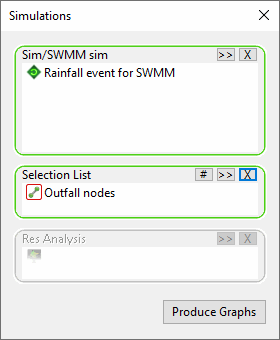
Example of Selection List boxes in InfoWorks ICM