Study notes
You can create study notes to remind you of important facts about a study. To work with study notes, you must have an open project with at least one study in it. Once open, you can write whatever you want in the notes and the information is saved automatically.
To create Study Notes
- Open a study.
- Click
 (View tab > Windows panel > User interface) and select Notes from the list.
 - Record your information in the Study Note page that appears on the right-hand side of the model pane.
To close Study Notes
Either
- Click the 'x' in the top right corner of the Notes pane
or
- Click (View tab > Windows panel > User interface) and select Notes from the list.
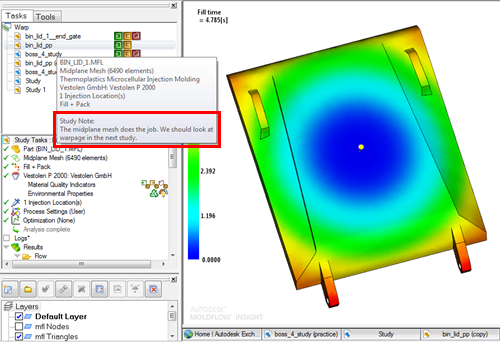
To view Study Notes without opening the study
Hover over a study.
A dialog appears with information about the study. If there are study notes associated with the study, they will appear at the bottom of the dialog under the heading Study Note.