Checking the mesh
After generating or modifying the mesh, it is advisable to perform a series of diagnostic checks to ensure that the mesh is suitable for analysis.
The following tools are provided for assessing the quality of the mesh:
- Mesh Statistics
- Mesh Repair Wizard
- Mesh Diagnostics
Note: If you are changing mesh types from Dual Domain to 3D, you should diagnose and correct any meshing issues on the Dual Domain mesh before generating the 3D mesh.
To obtain the best analysis results, the mesh must be free of errors and meet the following conditions:
Element aspect ratios ideally should be below the following limits:
- 20:1 for triangular elements in Midplane and Dual Domain meshes.
- 30:1 for triangular elements in a Dual Domain mesh that will be converted to a 3D mesh.
- 50:1 for tetrahedral elements in a 3D mesh.
In a Dual Domain model, we recommend to keep the mesh match ratio above 85% for flow analysis, and above 90% for warpage analysis.
In Midplane and Dual Domain models, significant thickness changes must be represented with at least three rows of elements to ensure accurate prediction of flow issues such as hesitation or racetracking.
Optionally, you can remove small features like fillets and radii from Midplane and Dual Domain models to reduce the computing time. These features can be analyzed in 3D models, with a very high mesh density and little overall change in the results - as there is additional computational time required, removing the fine in these areas can often be justified.
A good mesh is critical for accurate results. The recommendations below will help you to evaluate and adjust the mesh as required.
Visual Inspection
Some anomalies can be identified just by looking at the mesh, such as the mesh density:
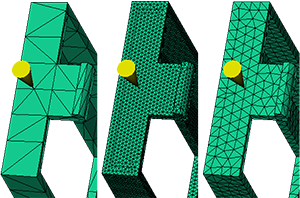
Visual inspection of a Dual Domain mesh
The figure above shows three significantly different mesh densities on the same model.
- The first mesh is a too coarse (has few elements), and this mesh may not represent part thickness changes well.
- The second mesh has many more elements than necessary; this will result in a long computing time with limited increase in accuracy.
- The third example has a good mesh density. There are several rows of elements on the side, and the elements are approximately equilateral triangles, which indicates acceptable aspect ratios have been achieved.
Mesh Statistics
Once the visual inspection has determined the mesh density looks right, use the Mesh Statistics report to determine if the quality of the mesh is acceptable.
For Midplane and Dual Domain models, the Mesh Statistics report includes the following sections:
- Entity counts.
- Edge details.
- Orientation details.
- Intersection details.
- Surface triangle aspect ratio.
- Match percentage (Dual Domain models only).
For 3D models, the Mesh Statistics report includes the following sections:
- Nodes (Number).
- Elements (Tetras: Number, Volume, Aspect ratio, Maximum dihedral angle; and Beams: Number, Volume).
- Total volume.
Once a problem has been identified in the mesh statistics, corrective action can be taken to fix the problem.