Work with nodes in the Schematic view
Accessing the Schematic view
To switch to the Schematic view and view a hierarchy of the nodes in your scene, do one of the following:
- Select Schematic from the Viewer window View menu.
- Click in the Viewer window, then press Ctrl-W.
To switch out of the Schematic view, back to the previous camera view, press Ctrl-W again, or select another View from the View menu.
Selecting nodes
To select nodes in the Schematic view:
- Double-click or Spacebar-drag around them.
To select the parent of a hierarchy and all of its children:
Spacebar-right-click the parent. Ctrl-click on nodes to add them to the selection.
Note: When you select models, cameras, or other objects in the Schematic view, they are also selected in the camera view(s).
Undo/Redo functions
To use the undo/redo functions in the Schematic view, use Ctrl-Z to undo or Ctrl-Y to redo. For the undo/redo functions for panning, zooming and framing, use Alt-Z to undo or Alt-Y to redo.
Note: The
Alt-ZandAlt-Yundo/redo functions are only compatible with panning, zooming and framing. TheCtrl-ZandCtrl-Yundo/redo functions are compatible with the movement of nodes, expanding and collapsing of nodes, the selection of an existing bookmark, and turning on and off Auto Arrange.
Search for object nodes
You can search for nodes in the scene by typing a name into the Find Model By Name search area. MotionBuilder generates a list of search results based on the search term you type.
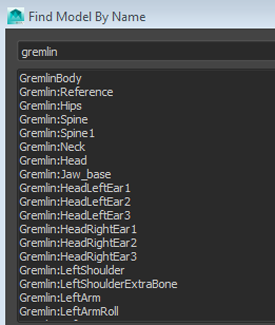
Select any of the search results highlights the node in Schematic View.