Creating bookmarks in the Schematic view
Bookmarks in the Schematic view let you quickly jump from one region of the schematic to another without having to find the nodes in the hierarchy manually. Bookmarks save the following information:
- The x and y position of the existing nodes
- The expanded or collapsed state of the nodes
- The width, height, and zoom factor used by the schematic view
To create a bookmark in the Schematic view:
In the Schematic view, click
 in the Camera View toolbar and select Create Bookmark from the menu that appears.
In the Create Schematic Bookmark dialog box that appears enter the name of your bookmark.
Your bookmark appears in the menu and is listed as the current bookmark at the bottom left corner of the view:
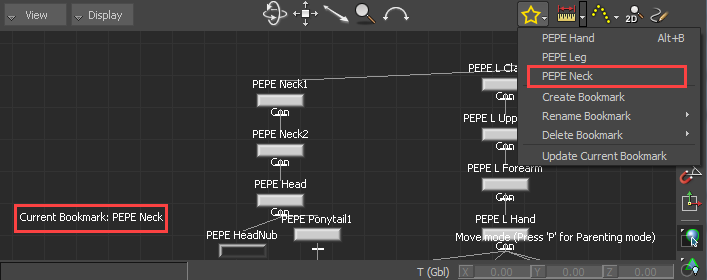
Tip: When you have many bookmarks in the schematic view, you can cycle through them quickly with the Alt + B shortcut.
To update a bookmark in the Schematic view:
Make changes to your nodes in the Schematic view.
When changes are made to the current bookmark, an asterisk (*) appears beside the name of the bookmark in the bottom left corner of the view:
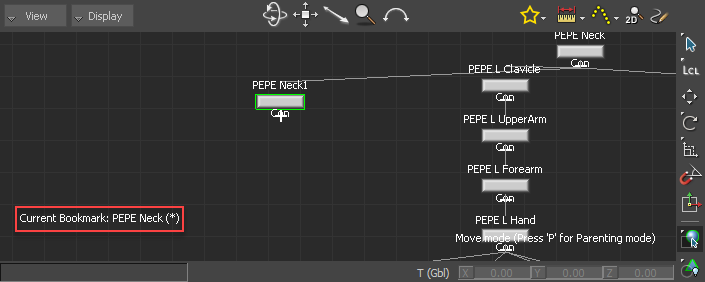
Click
and select Update Current Bookmark from the menu that appears.The changes are saved to the bookmark and the asterisk disappears from the bottom left corner.
To rename a bookmark in the Schematic view:
- Click and select Rename Bookmark >
from the menu that appears. - Enter the new name of your bookmark in the Rename Schematic Bookmark dialog box that appears.
To delete a bookmark in the Schematic view:
- Click and select Delete Bookmark >
from the menu that appears.