Creating a stereo camera
To add a stereo camera using the Asset browser:
Drag a stereoCamera asset into the Viewer window from the Asset browser. The stereoCamera, stereoCameraLeft, and stereoCameraRight cameras are added to the Perspective menu and the Scene browser’s list of cameras, beneath the Camera switcher.
To add a Stereo camera using the Viewer window:
In the Viewer window, click View.
From the View menu select Perspective > Create New Stereo Camera.
The stereoCamera, stereoCameraLeft, and stereoCameraRight cameras are added to the Perspective menu and the Scene browser's list of camera's beneath the Camera switcher.
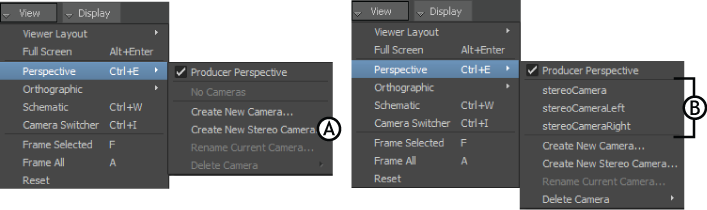
View menu A. Add a stereo camera B. Stereo cameras in the Perspective menu
To adjust the Stereo camera viewing modes:
In the Viewer window, click Display.
From the Display menu select Stereo Display.
Note: The Stereo Display menu item will remain disabled until you are looking through the stereo camera in your scene.
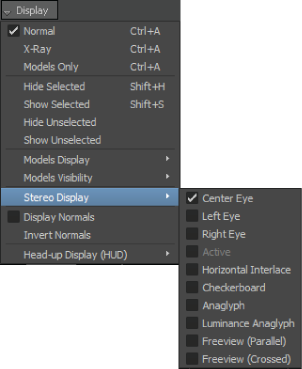
Stereo Display menu
The Stereo Display menu lets you select from different viewing modes.