This tab displays the character with Control rig and HumanIK controls.
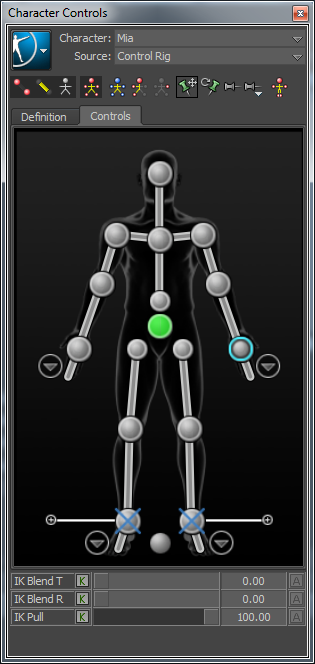
The following table provides a brief overview of tasks that you can perform using the Controls tab:
To...
Do this
Create a Control rig
Select Control Rig from the Source menu
or
Select > Create > Control Rig.
Change the appearance of rig effectors
Select > Edit > Controls > Rig Look, then select an effector style.
Change to Full Body keying and manipulation mode
Click .
Change to Full Body - No Pull Manipulation mode
Click .
Change to Body Part keying and manipulation mode
Click .
Display the skeleton of the character
Click .
Set the animation source for the current character
Select another HumanIK defined character by name from the Source menu.
Create an auxiliary or pivot effector
Right-click an IK effector cell and select Create Aux Effector or Create Aux Pivot.
Remove an auxiliary or pivot effector
Select the effector in the scene and press the Delete key.
Pin an effector in Translation
Select the corresponding IK effector cell, then click .
Pin an effector in Rotation
Select the corresponding IK effector cell, then click .
Temporarily release all pinning
Click .
Select an effector
When you click an effector:
Click to select an effector
Shift-click to select an effector and all effectors in the same body part
Ctrl-click to add or remove additional effectors to the selection
Shift-Ctrl-click to add an effector and all effectors in the same body part, to the selection (Shift-Ctrl-click to remove effectors from the selection if it is already selected)
When you click an empty area of the Controls tab:
Singe-click to select all effectors in the current view
Double-click to deselect the effector cells and effectors
Shift-click to select all effectors
Ctrl-click to add all the effectors in the current view to the selection (Ctrl-click to remove effectors from the selection if it is already selected)
Create a pinning preset
Assign translation and rotation pinning to desired effector(s), then select > Create Preset.
Bake the active Source onto the current Character
Select > Bake > Bake To Skeleton
(or)
Select > Bake > Bake To Control Rig
Edit retargeting parameters in the Attribute Editor