3D ソリッドの和演算、差演算、交差演算によって、複雑な形状を作成することができます。
注: Windows 版 AutoCAD LT では、3D ソリッドの修正はサポートされていません。
ソリッドは、接合、くりぬき、共通部分の抽出を行うことができます。ソリッドを組み合わせるには、Boolean メソッドか CheckInterference メソッドを使用します。
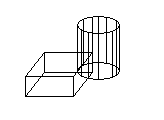
ソリッドは、ソリッドの 2D 断面を取得するかソリッドを 2 つに切断することによってさらに修正されます。ソリッドの断面を取得するには、SectionSolid メソッドを使用します。ソリッドを 2 つに切断するには、SliceSolid メソッドを使用します。
ソリッド間の干渉を検出する
次の例では、直方体と円柱をモデル空間に作成します。次にこの 2 つのソリッド間の干渉を検出し、その干渉から新しいソリッドを作成します。見やすいように、直方体は白、円柱はシアン、干渉ソリッドは赤にそれぞれ色付けします。
Sub Ch8_FindInterferenceBetweenSolids()
    ' Define the box
    Dim boxObj As Acad3DSolid
    Dim length As Double
    Dim width As Double
    Dim height As Double
    Dim center(0 To 2) As Double
    center(0) = 5: center(1) = 5: center(2) = 0
    length = 5
    width = 7
    height = 10

    ' Create the box object in model space
    ' and color it white
    Set boxObj = ThisDrawing.ModelSpace. _
 AddBox(center, length, width, height)
    boxObj.Color = acWhite

    ' Define the cylinder
    Dim cylinderObj As Acad3DSolid
    Dim cylinderRadius As Double
    Dim cylinderHeight As Double
    center(0) = 0: center(1) = 0: center(2) = 0
    cylinderRadius = 5
    cylinderHeight = 20

    ' Create the Cylinder and
    ' color it cyan
    Set cylinderObj = ThisDrawing.ModelSpace.AddCylinder _
 (center, cylinderRadius, cylinderHeight)
    cylinderObj.Color = acCyan

    ' Find the interference between the two solids
    ' and create a new solid from it. Color the
    ' new solid red.
    Dim solidObj As Acad3DSolid
    Dim bSolidsInterfere As Boolean
    Set solidObj = boxObj.CheckInterference(cylinderObj, True, bSolidsInterfere)
    solidObj.Color = acRed
    ZoomAll
End Sub
ソリッドを 2 つのソリッドに分割する
次の例では、直方体をモデル空間に作成します。次に 3 つの点で定義した平面に基づいて直方体を切断します。断片は 3DSolid として返されます。
Sub Ch8_SliceABox()
    ' Create the box object
    Dim boxObj As Acad3DSolid
    Dim length As Double
    Dim width As Double
    Dim height As Double
    Dim center(0 To 2) As Double
    center(0) = 5#: center(1) = 5#: center(2) = 0
    length = 5#: width = 7: height = 10#

    ' Create the box (3DSolid) object in model space
    Set boxObj = ThisDrawing.ModelSpace. _
 AddBox(center, length, width, height)
    boxObj.Color = acWhite

    ' Define the section plane with three points
    Dim slicePt1(0 To 2) As Double
    Dim slicePt2(0 To 2) As Double
    Dim slicePt3(0 To 2) As Double

    slicePt1(0) = 1.5: slicePt1(1) = 7.5: slicePt1(2) = 0
    slicePt2(0) = 1.5: slicePt2(1) = 7.5: slicePt2(2) = 10
    slicePt3(0) = 8.5: slicePt3(1) = 2.5: slicePt3(2) = 10

    ' slice the box and color the new solid red
    Dim sliceObj As Acad3DSolid
    Set sliceObj = boxObj.SliceSolid _
 (slicePt1, slicePt2, slicePt3, True)
    sliceObj.Color = acRed
    ZoomAll
End Sub