HUD 要素を Profiling Center に表示する
HUD 要素を HUD アセットに追加する際、 HUD 要素の MotionBuilder のパフォーマンスに対する影響を把握していることが重要になります。これは、HUD のパフォーマンス メトリックおよびその要素を Profiling Center に表示することで確認できます。
Profiling Center で HUD およびその要素を表示するには
Window メニューから、 Profiling Center を選択します。
Profiling Center ウィンドウが表示されます。既定では、Profiling Center には Viewer ウィンドウ の HUD およびその要素は表示されません。
Profiling Display Settings 領域:
Display Details メニュー オプションで、Rendering を選択します。
Profiling Mode メニュー オプションで、Rendering Only を選択します。
Evaluation Depth フィールドで、ダブルクリックして 10 (Evaluation Depth の最大値)を入力します。
ヒント:Evaluation Depth の値を大きくするには、フィールド上をカーソルでドラッグすることもできます。
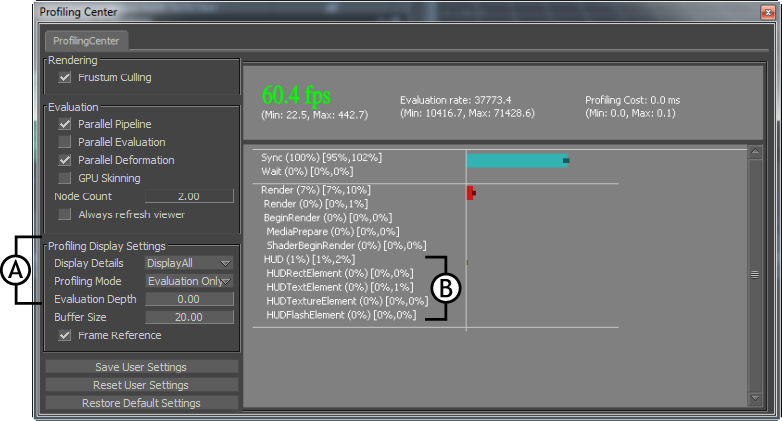
Profiling Center ウィンドウ A.HUD およびその要素を表示するための設定 B.HUD および追加された要素タイプ
ヒント:
パフォーマンスの影響をミリ秒(ms)で表示するには、Profiling Display Settings ペインの Frame Reference チェックボックスをオフにします。