Selecting Objects to Output
You can select objects to include in your output by using the Object Options and Object List, or the Edit Output mode. Objects that are part of an output are displayed in the Object List. For each selected object, you can decide if you want it to be visible in the final render or not. Non-renderable objects, such as cameras, are always included in outputs.
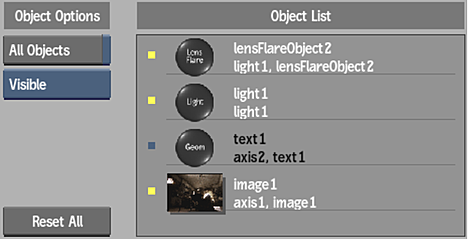
To select an object:
In the Object List, click an object.
Selected objects are highlighted in the Object List, schematic, and image window.
To select additional objects, Ctrl-click another object.
Note: When you select multiple objects with different visibility settings (Visible or Occluded), Mixed is indicated in the Visibility drop-down.
To output all objects:
In the Object Options, enable All Objects.
All objects in the scene, as well as any object you subsequently create, are included in the selected output.
To set the visibility of an object:
Select an object from the Object List.
From the Visibility drop-down, select one of the following:
- Occlude Only: Renders the object as black, excluding it from the shading effect. The result is a perceptual hole where the object was originally located.
- Visible: Renders the object in the final render.
To add or remove an object from the Object List:
From the Tools drop-down, select Edit Output.
Note: In Edit Output mode, All Objects in the Object Options is disabled when you remove objects from the selected output.Add or remove objects from the output by doing one of the following in the schematic:
- Click an object. The complete tree of the object in the schematic must either be selected or greyed out for it to be included or excluded from the output.
- Press Ctrl and drag in the schematic to add or remove multiple objects (or trees) from the output. This acts as a toggle between selected or greyed out (included or excluded from the output).
To set all objects to Visible mode:
Click Reset All.
All objects in the selected output are set to the Visible mode.
Object Options
All Objects
Enable to output all objects in the Object List.
Visibility option
Select a visibility option for the selected object.
Reset All
Click to set all objects to Visible mode in the Object List.