Input Menu Settings
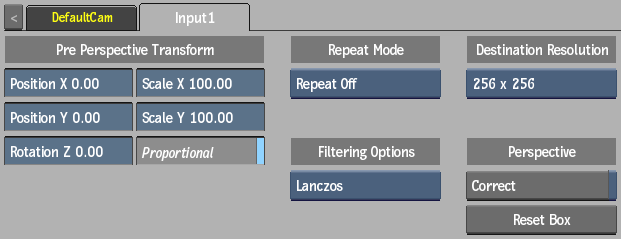
Position X field
Displays the X-axis offset applied to the clip.
Position Y field
Displays the Y-axis offset applied to the clip.
Rotation field
Displays the rotation offset applied to the clip.
Scale X field
Displays the X-axis scaling offsets applied to the clip.
Scale Y field
Displays the Y-axis scaling offsets applied to the clip.
Proportional
Enable to affect the Scale fields proportionally.
Repeat Mode option
Select how the input media is repeated (after Transform settings are applied).
Filter option
Select the type of filtering to apply to the input media.
Destination Resolution option
Select the square destination resolution of the input media.
Perspective Correct option
Enable to apply perspective transformations to the input. Switch to Object view (F8), and interactively align the perspective of what area you want to include in the input image.
Reset
Click to reset the Perspective option in the Object view.