UV Menu Settings
Regen
Enable to dynamically refresh the image as changes are made to the UV settings.
Controls Menu
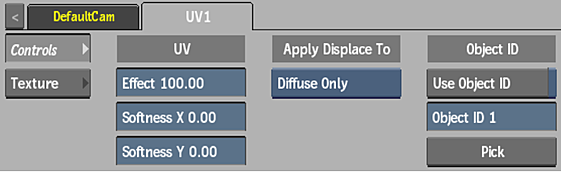
Effect field
Displays the amount of displacement applied to the UV map.
Softness X field
Displays the amount of softness along the X axis of the UV map.
Softness Y field
Displays the amount of softness along the Y axis of the UV map.
Apply Type option
Select which attached maps are affected by the UV map.
Use Object ID
Enable to use Object ID info embedded into the blue channel when using a UV map generated by Maya. When disabled, blue channel information is ignored.
The object ID allows you to control which objects within the UV map are displaced. In Maya, when performing a UV Render Pass, enable Embed Object ID in Blue Channel.
Object ID field
Displays the specific blue value corresponding to an object ID.
Pick
Click to display the picker to select an object ID in the image through its blue value.
Texture Menu
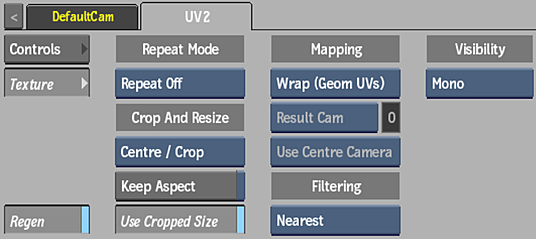
Repeat mode option
Select how the UV map pattern is repeated on the surface.
Fit Method option
Select a fit method option to be applied to the UV map.
Keep Aspect
Enable to preserve the aspect ratio of non-square pixels (not available for the Fill fit method).
Use Cropped Size
Enable to replace the UV map with the cropped size of the UV media. Disable to use the cropped UV media as is.
Mapping option
Select the type of texture mapping.


Camera option
Specify which camera's FOV to take into account when using perspective or projection mapping.
Camera field
Displays the active perspective or projection camera number.
Stereo Camera Projection option
Select whether to use the centre, left, or right camera from a stereo camera rig when projection mapping.
Filter option
Select the type of filtering to apply to the UV map.
| Type | Description |
|---|---|
| Nearest | No filtering — the pixel of the texture closest to the screen pixel is displayed. |
| Linear | Basic bilinear filtering. |
| Anisotropic | Non-proportional filtering between X and Y (faster to process than EWA, but with a lesser quality). |
| Aniso+Linear | A combination of Anisotropic and Linear filtering. |
| EWA | A high-quality elliptical weighted average filter to produce enhanced rendering results (slower to process than other filters). |
| EWA+Linear | A combination of EWA and Linear filtering (offers the most advanced filter processing). |
Camera Type option
Select the camera type visibility for the UV map. For example, you can use this setting to apply a Left Eye and Right Eye camera type for two maps that are children of the same surface or geometry in a stereo scene.