Electrical Catalog Browser Dialog Box
Insert a part from the electrical catalog database or edit the catalog database.
Ribbon: Assemble tab  Component panel Place drop-down Electrical Catalog Browser.
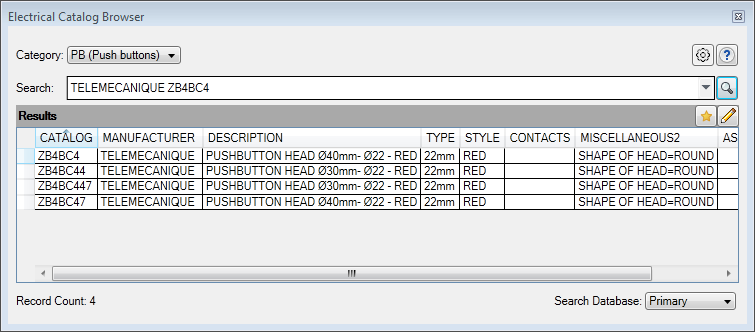
List of Options
The following options are displayed.
Category
Selects the catalog table to search.
Search
Specifies the search criteria. A search is performed only on the fields that are displayed in the browser. The AND operation is assumed. Using OR and "exact phrase" expressions are supported.
Examples:
- Red Illuminated - displays records that contain both Red and Illuminated in any of the displayed fields but not necessarily together
- Red OR Illuminated - displays records with Red or Illuminated in any of the displayed fields
- "Red Illuminated" - displays records with the exact phrase in any of the displayed fields
As the search text is typed, manufacturer names and previous searches that match the search text display in a drop-down list.

Opens the Options dialog box where you can define the primary and secondary electrical catalog databases.

Performs the search based on the search text.

Displays the catalog entries previously added to the favorites list for the active category.

Switches to the edit mode where you can add catalog entries and edit existing ones.
Search Database
Controls which database is active; primary or secondary. If there is no secondary database defined for the active project, the secondary option is disabled.
Column header
Sorts the results based on the values of the selected column.
Column Header Context Menu
Right-click on any column header in the results section to display the context menu.
Column label list
Controls the visibility of the column.
More...
Displays the Columns to display dialog box where you can change the visibility of all columns in the database table you are viewing.
Freeze/Unfreeze column
Freezes a column, so when you scroll all columns to the left of the frozen column remain visible.
Restore all columns to defaults
Reverts all column changes including size, order, and visibility.
Insertion Mode Only
Select a record in the results pane to open the insertion mode submenu.


Browse to a part to insert. The part is associated to the selected catalog record automatically for the next time you select this catalog record.Note: If the folder location for the part is not included in the libraries for the project, the part is not associated to the catalog record.

Displays the URL or document associated with the record as defined in the Weblink field.

Adds the record to the favorites list for the active category. Visible on the submenu when the selected record is not in the favorites list.

Removes the record from the favorites list for the active category. Visible on the submenu when the selected record is in the favorites list.
Edit Mode Only
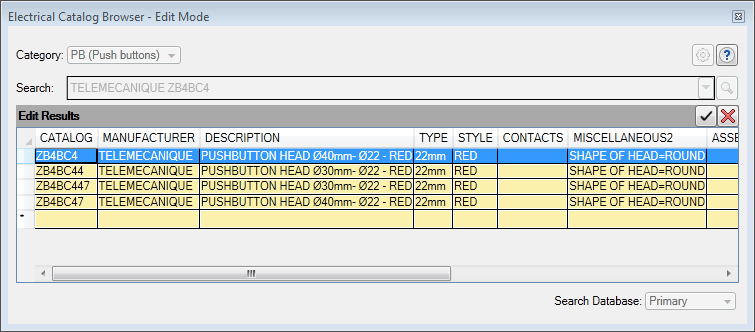

Commits the edits to the catalog database.

Cancels the edits so they are not written to the catalog database.
Edit Mode Context Menu
Cut, Copy, Paste
Cuts or copies the selected cells. Pastes previously cut or copied content.
Copy Row
Copies the rows for all selected cells.
Paste Row
Pastes a previously copied row at the end.
Delete Row
Deletes the rows for all selected cells.
Weblink
Displays the URL or document associated with the record as defined in the Weblink field.