Exclude components and features from analysis
To simplify a part model, remove low impact parts or features that can complicate mesh creation. Remove parts that play no substantial role in the simulation results, and parts with small features such as:
- Small holes with diameters less than 1/100 of the part length.
- Outer convex rounds with small radii.
- Label imprint and emboss features.
To simplify an assembly model, exclude small parts with functionality that is simulated by constraints or forces. Suppress parts that do not carry significant loads or are not critical to structural or thermal integrity for the design, and play no role in simulation results. Exclusions are simulation-specific.
Exclude components from simulation
- Component is removed from the list of components participating in the simulation.
- Any component can be excluded in any simulation.
- Excluded components are still visible in the assembly, and if you change environments to the assembly environments.
Suppress component
- Component is visible in the assembly or other environments, including simulation.
- Component cannot be used in any simulation.
Exclude assembly component from analysis
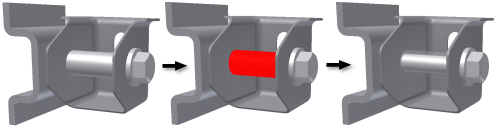
In the assembly browser, expand the nodes. Right-click a component node, and click Exclude From Simulation
or
In the graphics area, right-click the component and click Exclude From Simulation.
The display of the excluded component changes to transparent while in the simulation environment.
Exclude features from analysis
Exclude features from analysis to expedite the meshing process. In the Part or Assembly modeling environment, exclusions from analyses are ignored.
- Exclude features in the graphics area.
- On the ribbon, change the select filter to Select Features
 .
. - In the graphics area, select one or more features to exclude.
- Right-click, and click Exclude From Simulation.
In the graphics area, the features and their dependent features become invisible. In the browser, the features and their dependents are unavailable and display the Exclude icon  .
.
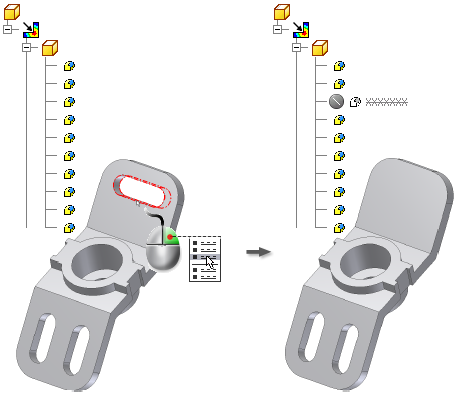
- Exclude features in the browser
- In the browser, expand the nodes.
- Right-click the feature and select Exclude From Simulation.