To Save Assembly Files to and from a Connected Drive
Let's look at what happens when you use the Save or Save as command in Inventor to save an assembly file and it's references on a local drive to a connected drive or to save from a connected drive to a local drive.
The referenced files are saved in a folder called Related Data. The files aren't saved as a hierarchy based on the project file settings.
The referenced files aren't immediately uploaded. The referenced files will be uploaded to a folder named Related Data on the connected drive after Inventor is closed.
Note: Also, when you close Inventor, the context of a project files/search path is lost.
To maintain the folder structure, refer to the information below for saving an assembly file to and from a connected drive.
To Save Assembly Files to a Connected Drive
- Save the files, and then close Inventor.
- Then, using Windows Explorer, drag and drop the files from your local drive to your connected drive.
To Save Inventor Files on a Connected Drive to a Local Drive
Use the Export context menu option to export a file to your local drive. The default .ipj for the project is used and all file references are exported to the specified folder.
Right-click on a file in a connected drive that you want to export and select Export.
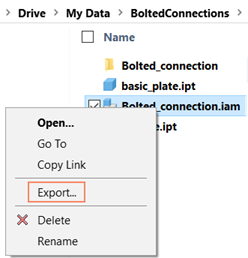
Navigate to the folder to which you want to export the file and its references and click Select Folder.
The files are placed as a hierarchy based on the project file settings.