Configure Database (Electrical Catalog Browser)
Ribbon: Assembly tab  Component panel Place drop-down Electrical Catalog Browser.
Click  .
.
Specify the type of database for your source of catalog information.
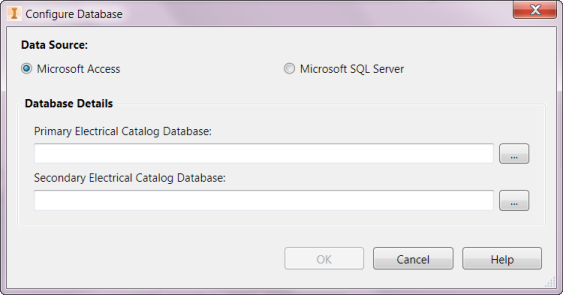
Microsoft Access
You can use two catalog database files if you are using Microsoft Access for your catalog data information when working with an Electromechanical project: the first file can contain the catalog information that you commonly use, and the second file can contain the full list of catalog content available with AutoCAD Electrical.
Primary Electrical Catalog Database
Defines the folder and name of the catalog database. By default it is the catalog database installed with AutoCAD Electrical.
Secondary Electrical Catalog Database
Defines the folder and name of the optional secondary catalog database. A common use for a secondary catalog database: the primary file can contain the catalog information that you commonly use, and the secondary file can contain the full list of catalog content available.
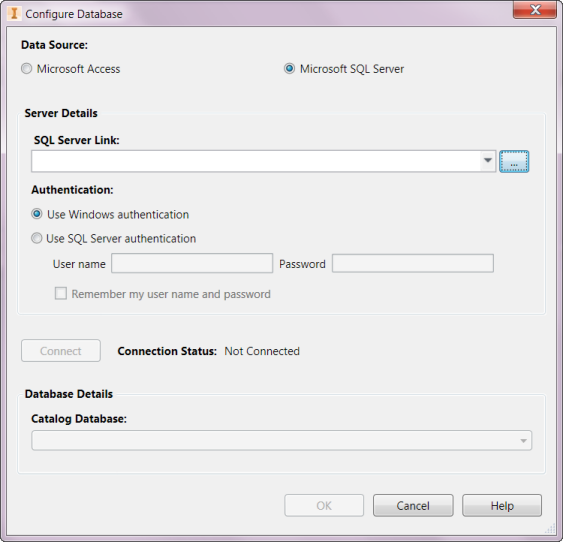
Microsoft SQL Server - Server Details
You use one catalog database file when working with an Electromechanical project.
For more information, see About the Electrical Catalog Database