Simplify Assemblies Enhancements
Learn about the areas where interoperability improvements were made.
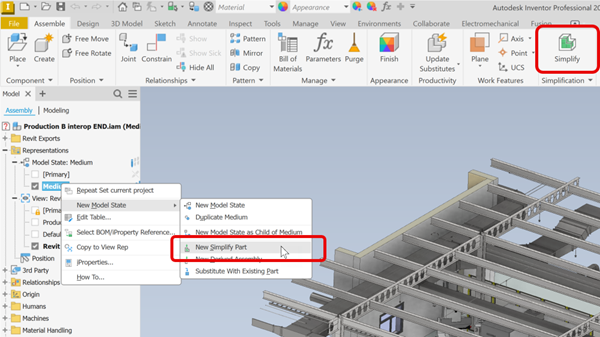
Access points
Access points for Simplify tasks have been updated to adjust for the BIM Content changes.
For non-architectural Inventor assemblies, the access points are:
- Assemble tab
 Simplification panel Simplify
 - Browser: Model State node New Model State New Simplify Part
- Assemble tab
For for assemblies used in architectural projects, the access points are:
- File menu Export Export RVT - output file type is restricted to .rvt only.
- Environment tab BIM Content RVT panel Simplify & Export - output file is restricted to .rvt only.
- Environment tab BIM Content RFA panel Simplify Substitute - creates an assembly substitute. Typically used in connection with the Export Building Components command.
- File menu
Template Option
A Template selection field is added to the Simplify panel. You can use the installed templates or your custom templates.
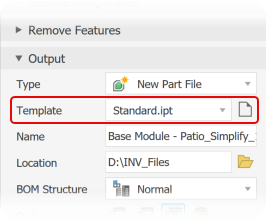
For standard Inventor Assemblies, the Assemble tab
Simplification panel Simplify. The standard Inventor model templates are the default path. Browse to and use your custom templates.Standard Inventor model templates are used for the Simplify Substitutes command for RFA export.
For Architectural project (RVT) output Simplify has a new access point. For more information see Revit Interoperability Enhancements