To create a camera shot
In the Camera Sequencer toolbar, click the Create Shot button.
This is the primary way to create a shot. The behavior of the Create Shot button changes depending on whether you left-click or access the flyout menu.
- Left-click to create a shot using the current range slider. This is the default shot creation method.
- To access more shot creation options, click on the caret icon next to the Create Shot button. A flyout menu will appear with additional options such as creating a shot based on a selected range from the Time Slider or using the settings from the "Create Shot Options" window.
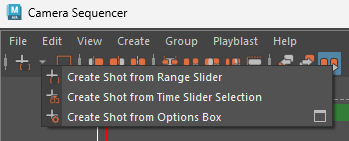
To create a shot using the Time Slider
- In the Time Slider, Shift + drag to select a frame range.
- In the Camera Sequencer toolbar, left-click the
Create Shot button.
- If a time range is selected in the Time Slider, a new shot is created with that start and end time.
- If no time range is selected, the shot is created using the most recent settings from the Create Shot Options window.
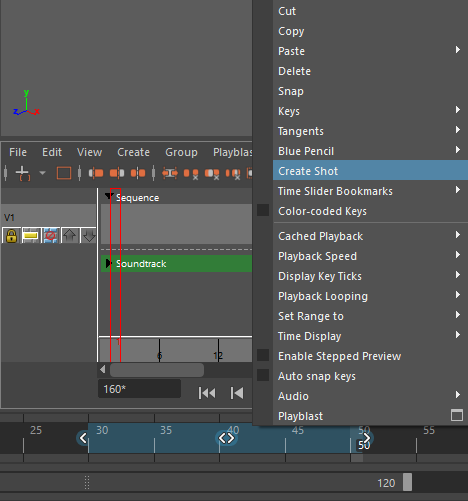
The shot can also be created from the Time Slider context menu. After selecting a range on the Time Slider, you can right-click on the Time Slider and choose the "Create Shot" option from the context menu. This will create a shot based on your Time Slider range selection.
To create a shot using the Create Shot Options
Use the Create Shot Options to create shots with specific start and end times, or with a set duration.
In the Camera Sequencer toolbar, click the caret icon next to the "Create Shot" button, then select the "Create Shot from Options Box" option. Click the options box icon to open the Create Shot Options window.The Create Shot Options window opens.
- Select one of the following modes:
-
Absolute Mode: Manually set the start and end frames for the new shot. The Maya Playhead position is not used in this mode.
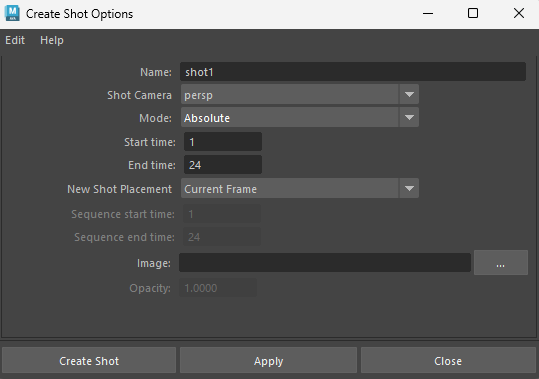
- Enter the desired frame numbers in the Start frame and End frame fields. Note: If the End frame value is less than the Start frame, it will be automatically set to Start frame + 1.
- Click Create.
-
Relative Mode: Create a shot with a specific duration that begins at the current Playhead position
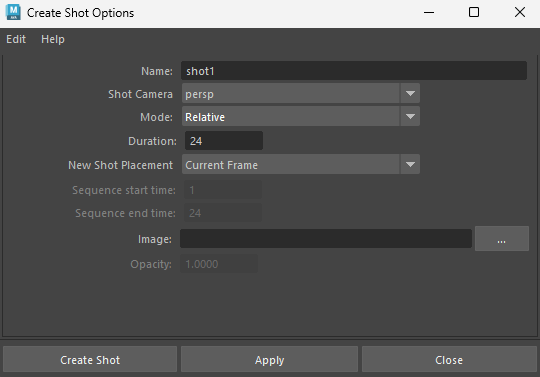
- Enter a value in the Duration input box.
- Click Create.
The new shot is created with a range of [Maya Playhead Value] to [Maya Playhead Value + Duration].