Set ghost manipulator time properties
You can display the Story ghost clip manipulator at any frame in the timeline by setting a Ghost Manipulator Time Mode. By default, is set to Start mode, which displays the manipulator at the first frame of the clip.
To set a clip's Ghost Manipulator Time Mode:
In the Story window, select the clip.
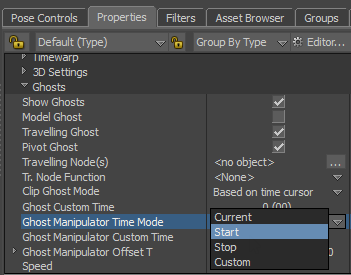
In the Properties pane of the Resources window, expand Ghosts.
Select Ghost Manipulator Time Mode and choose one the following options:
- Current — displays the manipulator at the current frame of the clip.
- Start — displays the manipulator at the start frame of the clip. This is default setting.
- Stop — displays the manipulator at the last frame of the clip.
- Custom — displays the manipulator at a specified frame.
(For Custom only) Select Ghost Manipulator Custom Time and type the frame number you want the clip's ghost manipulator to display.