Lock or mute properties and channels
You can lock properties or channels to prevent any changes from happening on the selected property or channel. This is useful for Technical Directors and animators who need to prevent body parts from receiving keys. For example, if there is more than one animator working on a character rig and the Technical Director does not want animation to be created to parts of the character, one way of achieving this is to lock or mute properties and channels.
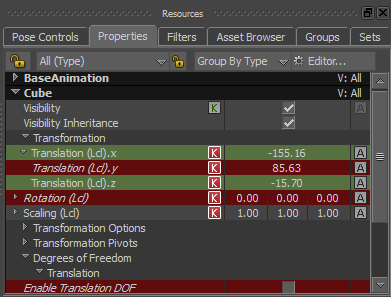
Locked Properties and channels are displayed on a red background
When working with locked properties and channel, be aware of the following:
- You cannot change values nor add keyframes on a locked property or a channel.
- Locked properties and channels display with a red background in the Resources, Properties, and Navigator windows and the FCurves Property list.
- After you lock or unlock a property, you can undo (Ctrl-Z) your action.
- You can choose to lock to a local value a channel or property that is set as a global value by using a relation constraint.
- Locked properties and channels are retained when the .fbx file is exported and imported to the Maya software and re-imported to MotionBuilder.
- Locked properties and channels are locked and reflected in all the applicable Viewer Reference modes (Global Reference mode
 , Local Reference mode
  , and Additive Reference mode
  ), even if you switch Reference modes as you work on the scene.
Locked channels are not preserved on open scene elements when updating animation using the File > Merge feature. When importing animation, locked channels are automatically unlocked and overwritten with the data from the incoming imported file.