Story preferences
The Preferences window includes the Story preference settings.
To access the Story preferences:
From the MotionBuilder menu bar, select Settings > Preferences.
In the Preferences window, click the Story preference option.
The Story preference settings display.
Story preferences
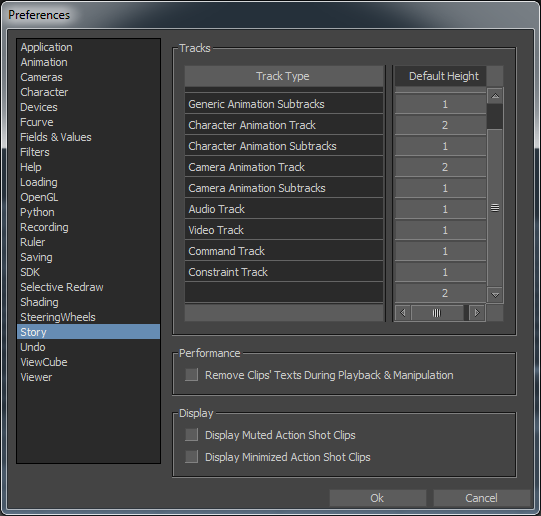
The Story preference settings consist of the following:
Tracks
The Story Tracks default height settings enable you to set the default height for the following track types:
- Folder
- Generic Animation track
- Generic Animation subtracks
- Character Animation track
- Character Animation subtracks
- Camera Animation track
- Character Animation subtracks
- Audio track
- Video track
- Command track
- Constraint track
Performance
Remove Clips' Texts During Playback & Manipulation
Let's you hide a story clip's text during playback and manipulation, improving performance in scenes that have many clips. Turn on this preference to hide text. This option is turned off by default.
Display
Display Muted Action Shot Clips
When turned on, shots are displayed even when the associated shot track is muted. This option is turned off by default.
Display Minimized Action Shot Clips
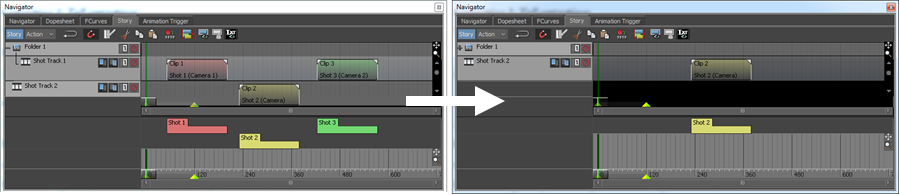
By default, a shot is hidden if its associated shot track is minimized or collapsed. Turn on Display Minimized Action Shot Clips to display shots belonging to shot tracks that are minimized or collapsed.
In the following image Display Minimized Action Shot Clips is on. Shots are still displayed when the folder containing the associated shot clips is collapsed.
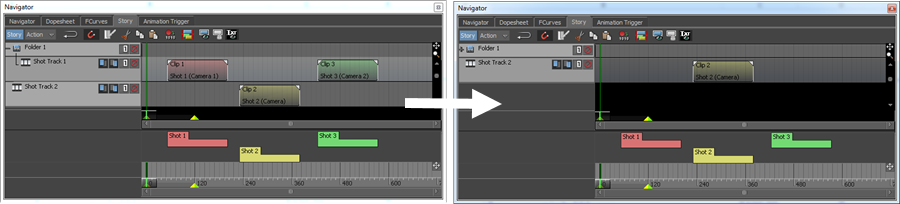
In the following image Display Minimized Action Shot Clips is off. Shots are hidden when the folder containing the associated shot clips is collapsed.