OpenGL Viewer Info window
The OpenGL Viewer Info window displays the supported OpenGL features, versions and capabilities of your computer’s OpenGL implementation as well as the Pixel Format setup.
You cannot modify information in the OpenGL Viewer Info window. The displayed information is for reference purposes only.
To access the OpenGL Viewer Info window:
From the MotionBuilder menu bar, select Settings
 Preferences.
In the Preferences window, click the OpenGL preference option.
The OpenGL preference settings display.
In the OpenGL Display Format preference settings, click the Viewer Info option.
The Viewer Info window appears, displaying by default the OpenGL pane information.
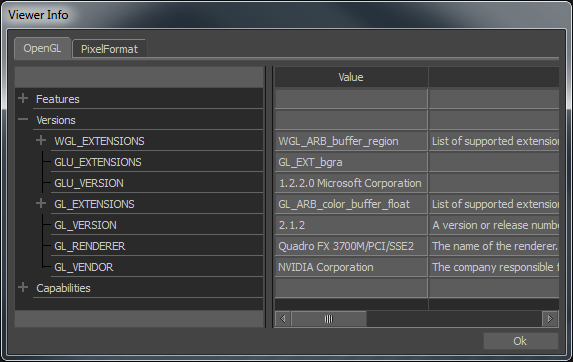
OpenGL Viewer Info OpenGL pane
The OpenGL Viewer Info window consists of two panes:
- OpenGL pane
- PixelFormat pane
The OpenGL pane contains the description and default values of your system's OpenGL supported features, versions, and capabilities.
The Features category includes information about the Display List and Shared Display List.
The Versions category includes information about:
- WGL supported extensions
- GLU supported extensions
- GLU version
- OpenGL supported extensions
- GL version
- GL renderer
- GL vendor
The Capabilities category includes information about the maximum allowable limits in your OpenGL version for:
- the number of supported lights
- texture sizes
- texture matrix stack depth
- attribute stack depth
- display list nesting
- modelview matrix stack depth
- projection matrix stack depth
- name stack depth
- application-defined clipping planes
- anti-aliased point sizes
- Viewer window width and height
- number of bitplanes in the Accumulation buffer color and alpha channels
- number of bitplanes in the Depth buffer
- number of bitplanes in the Stencil buffer
- number of bitplanes in the Color buffer color and alpha channels
The Pixel Format pane displays the supported UI and 3D Viewer default setup of your OpenGL graphics card.
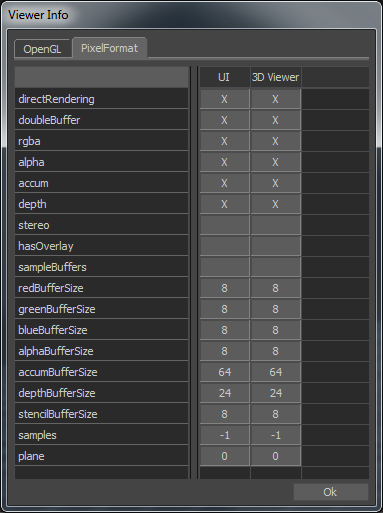
OpenGL Viewer Info PixelFormat pane
An X displays in any column that supports the specified value.
You cannot modify information in the PixelFormat pane. The displayed information is for reference purposes only.